Mileage reimbursement starts with mileage tracking: you need a clean record of business drives before a company can apply a rate, check tax treatment, or approve payment. The current federal starting point comes from the IRS 2026 mileage-rate announcement, but the real answer also depends on Publication 463, payroll treatment, state law, and the employer’s own policy.
This article is educational and is not tax, legal, payroll, employment, or financial advice. Mileage rules change by federal tax treatment, state law, employer policy, vehicle program, and tax year. Check the official source and a qualified professional before relying on a calculation.
Quick answer
Mileage reimbursement usually means approved business miles multiplied by a rate, but some employers use a car allowance or FAVR instead. If you want the trip record captured before the policy and payroll steps begin, MyCarTracks automatic mileage tracking can keep the mileage log ready for review.
Why mileage tracking comes first
Mileage reimbursement is payment tied to business use of a personal vehicle. Employees are the most common users, but nonprofits may reimburse volunteers, and some small businesses reimburse owners or staff for business driving too.
The trip still needs to qualify. Ordinary commuting from home to a regular workplace is usually treated differently from client visits, temporary assignments, supply runs, or travel between work locations.
What a reimbursement is meant to cover
A mileage rate is generally meant to represent the operating cost of using the vehicle for work. That can include fuel or charging, maintenance, depreciation, insurance, registration, repairs, and normal wear.
Parking and tolls are often handled separately, and some policies also address lodging, meals, or other travel costs. The mistake to avoid is assuming every employer includes those items the same way.
The main ways companies reimburse mileage
Employers usually choose one of three broad approaches:
- Standard cents-per-mile reimbursement. The simplest method and the one most people picture first.
- Car allowance. A fixed payment, often monthly, that is easier to budget but less tied to actual business mileage.
- FAVR. A fixed-and-variable program that separates ownership costs from operating costs and can be more precise for regular drivers.
Some employers also provide a company-owned vehicle, which changes the reimbursement question because the worker is no longer using a personal car for the same costs.
Current federal mileage rates
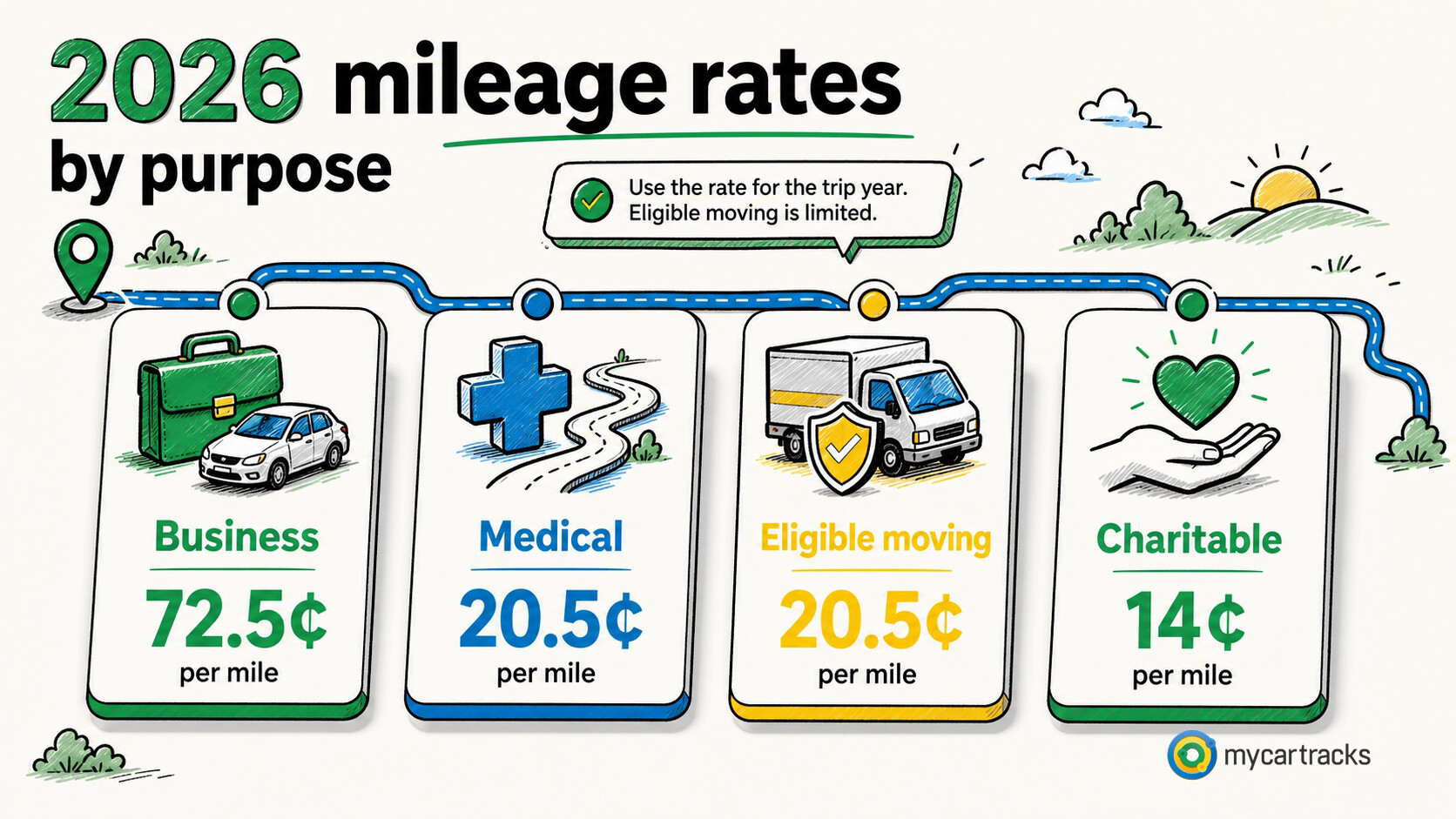
For 2026, the IRS standard mileage rates are 72.5 cents per mile for business, 20.5 cents for medical, 20.5 cents for eligible moving, and 14 cents for charitable service.
For reimbursement questions, the business rate is the one that usually matters first. If you need the year-by-year table or the 2025 comparison, Current IRS Mileage Rates for 2026 and Historical IRS Mileage Rates by Year are the next pages to use.
Why the rate changes over time
The business rate is reviewed each year, and the IRS has even made a mid-year change in the past when operating costs moved sharply. That is one reason reimbursement programs should not stay on autopilot for years at a time.
A company does not have to use the federal rate exactly, but it should know which tax year and rate source it is relying on before paying claims.
When reimbursement is usually tax-free and when it is not
Reimbursements are often handled tax-free when they are tied to a business connection, adequately substantiated within a reasonable period, and any excess amount is returned within a reasonable period. Publication 463 and Publication 15 are the practical federal sources for that framework.
The simple risk rule is this: unsupported payments and excess payments create tax and payroll problems faster than low-level math errors do.
Do employers have to reimburse mileage
There is no single federal rule requiring every employer to reimburse mileage in every situation. State law can matter, and a company also needs to watch minimum-wage and expense-shifting issues when workers pay for required business driving out of pocket, which is why the US Department of Labor’s state labor law resources and Which States Require Mileage Reimbursement? are better starting points than a one-line rule.
How companies decide what rate to use
Many employers use the IRS business rate because it is familiar, easy to explain, and easy to update each year. Others use a lower or higher cents-per-mile rate, a car allowance, or FAVR because their driving patterns, labor market, or cost structure point in a different direction.
Whatever the method, the policy should say who is covered, which trips qualify, what proof is required, how often claims are submitted, and how rate changes are handled.
Why reimbursement programs help both sides
A clear reimbursement program protects employees from paying business driving costs without a defined process, and it protects employers from ad hoc approvals, inconsistent payouts, and avoidable payroll arguments.
It can also be more flexible than a company-car or fleet model when workers drive their own vehicles only part of the time. Car Allowance vs Mileage Reimbursement and FAVR Reimbursement Plans Explained go deeper when program design becomes the real question.
How to calculate a reimbursement
The basic formula is simple:
approved business miles x the approved rate = reimbursement amount
If an employee has 150 qualifying business miles and the policy uses the 2026 IRS business rate, the mileage amount is $108.75 before separately handled parking or tolls. The tricky part is rarely the multiplication. It is the trip classification, the policy fit, and the proof.
Special cases that change the answer
If the employee owns or leases the vehicle, a standard per-mile reimbursement is often the easiest method to explain. If the vehicle is provided by the employer, the worker may still need reimbursement for some operating costs, but the standard mileage rate is not automatically the right answer because ownership costs are not being carried the same way.
If someone is self-employed on the side or works as an independent contractor, keep those records separate from employee claims. A contractor may bill mileage by contract, while a self-employed driver may be building a deduction file instead of a reimbursement claim.
What trips usually qualify and which ones do not
Client meetings, travel between work locations, temporary assignments, work errands, and similar business routes are the most common qualifying trips. Ordinary commuting from home to a regular workplace is the classic example of a trip that usually stays out.
If a route mixes business and personal stops, split it while the details are still easy to explain instead of hoping the total will be accepted later.
How to keep the record clean
A reimbursement record should connect the amount paid to the date, route, purpose, miles, rate source, approval, and payment. The cleaner that chain is, the easier payroll, accounting, and manager review become.
Manual logs can work, but they create more missed trips and more vague explanations. If you want the broader product view behind automatic trip capture, team reporting, and exports, see the MyCarTracks homepage.
Manual versus digital tracking for reimbursement
| Method | Why teams use it | Main weakness |
|---|---|---|
| Paper or spreadsheet log | simple and familiar | easy to submit late or estimate from memory |
| Mileage tracking app | automatic capture and cleaner claims | still needs review and policy alignment |
The right tool does not replace the policy, but it can make the policy much easier to follow consistently.
Decision workflow
Use the same decision path before applying a rate or submitting a report:
- Identify the person or entity using the record: employee, employer, self-employed worker, volunteer, contractor, owner, or fleet manager.
- Identify the purpose: reimbursement, deduction, payroll support, job costing, customer billing, vehicle program review, or fleet reporting.
- Identify the tax year and the US rule set that applies. Do not mix business, medical, moving, charitable, reimbursement, and state-law rules in one calculation.
- Confirm whether the trip qualifies under the relevant source. A route can be real and still be personal, commuting, or outside the policy.
- Apply the rate, method, or program only after the trip record is complete.
- Save the source, report, approval, and payment record together.
That order matters. Many mileage errors happen because someone starts with a rate and then tries to make the trip fit it. A stronger workflow starts with the trip facts and uses the rate only at the calculation step.
Mileage reimbursement workflow
A strong reimbursement workflow has five checkpoints:
- The trip has a business reason.
- The worker is covered by the policy or agreement.
- The distance is documented.
- The correct rate or method is applied.
- The payment is approved and recorded.
Employees should not have to guess what to submit. Employers should not have to interpret vague notes every pay period. The policy should define the fields, deadline, rate source, exceptions, and receipt rules. If state law requires more than the policy says, the policy should be updated rather than handled through one-off manager approvals.
The reimbursement record should also show what was paid and when. That closes the loop between the trip log, approval, payroll or accounts payable, and the bank transaction. If a reimbursement is denied or reduced, the reason should be saved too. Denials often become the most important records when employees, managers, payroll, and finance disagree later.
For recurring reimbursement programs, review outliers monthly. Look for duplicate routes, unusually high mileage, late claims, missing purposes, rate mismatches, and drivers who are always just below approval thresholds. The goal is not to punish employees; it is to catch policy confusion before it becomes a payroll or compliance issue.
Reimbursement examples by role
A sales employee may need reimbursement for client visits, trade shows, temporary assignments, and travel between worksites. A home health worker may need records by patient visit and care route. A service technician may need job ticket links, supply runs, and parts pickup notes. A remote employee may need a policy answer for driving from home to an office meeting. A nonprofit volunteer may need a different rate category from a business employee.
These examples should not all be paid the same way by default. They show why a reimbursement article needs trip purpose, role, policy, and source-backed rate context instead of only a calculator.
Reimbursement dispute prevention
Most reimbursement disputes are predictable. The employee thinks a trip was required. The manager thinks it was optional. The policy does not define the trip type. The record is late or missing. The rate changed and nobody updated the template. Prevent those disputes by publishing examples, requiring timely logs, saving approval notes, and reviewing exceptions monthly. Good reimbursement content should teach that prevention workflow, not only define mileage reimbursement.
Practical example
Suppose an employee submits a monthly mileage claim with client visits, supply runs, and one late route correction. The manager should be able to approve the business trips, reject or return unclear items, and keep the decision with the report. Payroll or accounting should then pay the approved amount using the policy rate for that period.
This works only when the claim includes dates, distances, purposes, vehicle, rate source, and approval notes. A vague “field work” total creates avoidable disputes.
Record quality standard
A mileage record is stronger when it can answer a skeptical review without the driver being present. The reviewer should be able to see the trip date, route or destination, distance, purpose, vehicle, category, and supporting documents. If the record depends on a vague memory such as “probably a client visit,” it is weak. If it points to a calendar entry, job ticket, customer, delivery, work order, reimbursement request, or receipt, it is much easier to trust.
For teams, a second quality standard matters: the report should be consistent across drivers. If one employee submits odometer readings, another submits rounded estimates, and another submits only fuel receipts, approvals become subjective. A shared format protects employees and employers because everyone knows what proof is expected before money or tax treatment is involved.
Source handling
Save the official source used for each rate, rule, or policy decision. For public articles, that means linking to the IRS or the relevant state source rather than repeating unsupported third-party claims. For internal company use, it means saving the policy version and source rate that were active when the trip was paid. This matters when a reader later asks why a 2026 trip was calculated differently from a 2025 trip, or why one state required a different reimbursement workflow from another state.
Review checklist
- Is the trip business, commuting, personal, medical, charitable, or another category?
- Is the rate from the correct tax year and rule set?
- Are different trip categories kept separate?
- Does the record name the vehicle and driver?
- Does the business purpose make sense without extra memory?
- Are parking, tolls, and other route costs handled separately?
- Are total annual vehicle miles needed?
- Is the reimbursement policy saved with the report?
- Are state-specific rules relevant?
- Is a professional review needed before filing, payroll, or policy decisions?
Operational notes
The cleanest mileage programs use a short feedback loop. Drivers review trips weekly. Managers approve or reject claims on a predictable schedule. Finance exports reports before closing the period. Policy owners review official rate changes at least annually. When each role owns a small part of the workflow, mileage records stay useful instead of becoming a year-end cleanup project.
The workflow should also have an exception lane. A missed trip, lost receipt, changed vehicle, late submission, temporary assignment, or unusual route should not be hidden in the normal report. Mark it, explain it, approve it separately, and keep the note with the record. Exceptions are normal; undocumented exceptions are what create risk.
For public-facing content, this operational layer is what raises the article above a definition page. Readers should leave knowing not only what the rule or rate is, but how to collect records, review them, correct problems, and produce a report that someone else can trust.
When to get professional review
Get tax, payroll, legal, or accounting review when the answer affects a filed return, employee wages, worker classification, taxable benefits, multi-state reimbursement, FAVR design, or a dispute over unpaid expenses. A mileage app can make the record cleaner, but it cannot decide the legal or tax treatment by itself.
Records to keep
Keep these records before a deadline or tax return forces the issue:
- date of each trip
- start and end location, destination, route, or client/job context
- business purpose
- distance driven
- vehicle used
- driver or employee name when a team is involved
- total odometer readings where required
- receipts for fuel, charging, repairs, parking, tolls, insurance, registration, and other vehicle costs
- reimbursement requests, approvals, denials, and employer policy documents
- tax-year rate source used for each calculation
Common mistakes
- using the current rate for an older tax year
- mixing commuting, personal errands, and business miles
- saving only payout, calendar, or bank records without a mileage log
- forgetting total annual miles when actual expenses or business-use percentages matter
- treating an employer reimbursement policy as if it were a tax rule
- treating a tax rule as if it were an employer reimbursement promise
- missing parking, tolls, support trips, return trips, and supply runs
- waiting until tax season to explain routes from memory
MyCarTracks workflow
Use MyCarTracks as the trip record layer, then let the tax, payroll, or accounting workflow decide how the records are used.
- Record trips automatically.
- Classify business and personal driving while the trip is still fresh.
- Add tags for employee, vehicle, client, project, platform, or state.
- Review mileage weekly so personal stops and unclear routes are fixed early.
- Export reports by tax year, pay period, vehicle, driver, or reimbursement cycle.