Mileage tracking works best when the daily habit is consistent and the regional rule is applied later. Record each trip, classify business and personal use, save receipts, and export reports before deadlines.
This article is educational and is not tax, legal, payroll, employment, or financial advice. Mileage rules change by country, state, province, employer policy, vehicle program, and tax year. Check the official source and a qualified professional before relying on a calculation.
Quick answer
In the US, mileage records often support IRS deductions, accountable reimbursements, or business-use percentages. In Canada, CRA guidance focuses on total kilometres, business kilometres, trip details, and odometer readings. In Europe, country-level rules matter, so the article should not promise one EU-wide mileage answer.
What to record everywhere
Keep these records before a deadline or tax return forces the issue:
- date of each trip
- start and end location, destination, route, or client/job context
- business purpose
- distance driven
- vehicle used
- driver or employee name when a team is involved
- total odometer readings where required
- receipts for fuel, charging, repairs, parking, tolls, insurance, registration, and other vehicle costs
- reimbursement requests, approvals, denials, and employer policy documents
- tax-year rate source used for each calculation
Why regional rules differ
The same trip can be used differently depending on the reader’s situation. A sales employee may submit a reimbursement request. A self-employed contractor may use the same trip in a vehicle expense calculation. A company may need the record for payroll, project costing, or client billing. Regional rules decide the tax result; the trip log preserves the facts.
United States
For 2026, the IRS business standard mileage rate is 72.5 cents per mile. The medical rate is 20.5 cents per mile, the moving rate is 20.5 cents per mile for eligible active-duty Armed Forces members and certain intelligence community members, and the charitable rate is 14 cents per mile.
The business rate is optional. A taxpayer who qualifies may use the standard mileage method or the actual expense method, but eligibility and first-year vehicle choices matter. IRS Publication 463 explains that actual vehicle expenses can include fuel, oil, tires, repairs, insurance, registration, licenses, depreciation, lease payments, tolls, and parking. If a vehicle is used for both business and personal driving, the business portion must be supported by mileage records.
For reimbursement, US employers often separate accountable and nonaccountable plan treatment. A reimbursement process normally needs a business connection, timely substantiation, and return of excess amounts to avoid payroll problems. Do not treat a mileage rate as proof by itself. The rate is a calculation tool; the log is the evidence.
Canada
Canada uses kilometre records rather than mile records. CRA guidance says that when a vehicle is used for both business and personal driving, the deductible or business portion depends on records for total kilometres and kilometres driven to earn income. A full logbook should show each business trip’s date, destination, purpose, and kilometres driven, plus odometer readings at the start and end of the fiscal period.
For 2026, the prescribed per-kilometre rates for tax-exempt employee allowances are 73 cents per kilometre for the first 5,000 kilometres in the provinces and 67 cents per kilometre after that. In the territories, the 2026 rates are 77 cents for the first 5,000 kilometres and 71 cents after that. Those rates are allowance limits for employee vehicle use; they do not replace self-employed motor vehicle expense records.
Europe
Europe should not be handled as one mileage rule. VAT, employee reimbursement, worker status, self-employed vehicle expenses, social contributions, invoices, and platform reporting can differ by country. EU sources are useful for context, especially around VAT and platform work, but a country tax authority is the source that matters for a local mileage calculation.
For a Europe-facing workflow, keep the core trip record the same: date, distance, route, purpose, vehicle, business relationship, and supporting receipts. Then apply the official country rule for the country where the worker or business files.
Decision workflow
Use the same decision path before applying a rate or submitting a report:
- Identify the person or entity using the record: employee, employer, self-employed worker, volunteer, contractor, owner, or fleet manager.
- Identify the purpose: reimbursement, deduction, payroll support, job costing, customer billing, vehicle program review, or fleet reporting.
- Identify the region and tax year. Do not mix US miles, Canadian kilometres, and country-specific Europe rules in one calculation.
- Confirm whether the trip qualifies under the relevant source. A route can be real and still be personal, commuting, or outside the policy.
- Apply the rate, method, or program only after the trip record is complete.
- Save the source, report, approval, and payment record together.
That order matters. Many mileage errors happen because someone starts with a rate and then tries to make the trip fit it. A stronger workflow starts with the trip facts and uses the rate only at the calculation step.
Mileage log workflow
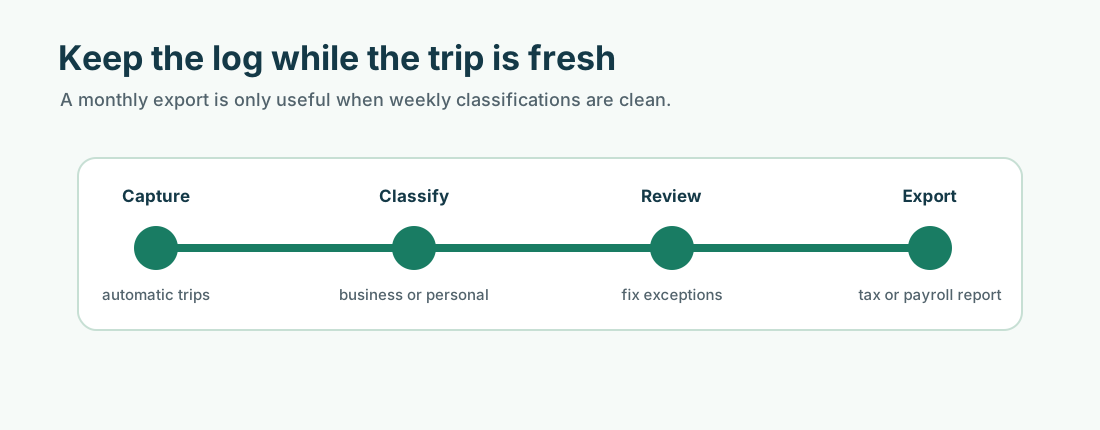
A mileage log should be maintained as work happens, not reconstructed from memory. The weekly workflow is simple: review new trips, classify each one, split personal stops, add business purpose notes, attach route costs, and export exceptions for correction.
For teams, the log should also show driver, vehicle, approval status, and project or client tag. For self-employed workers, it should preserve total vehicle use where required. For employees, it should match the reimbursement policy fields.
Practical example
Suppose a worker reviews trips every Friday. They classify customer visits, split a personal stop, add a project tag, attach a toll receipt, and mark one unclear route for correction. By month-end, the export already has clean records instead of guesses.
That weekly habit is what makes the log useful for taxes, reimbursement, and manager review.
Record quality standard
A mileage record is stronger when it can answer a skeptical review without the driver being present. The reviewer should be able to see the trip date, route or destination, distance, purpose, vehicle, category, and supporting documents. If the record depends on a vague memory such as “probably a client visit,” it is weak. If it points to a calendar entry, job ticket, customer, delivery, work order, reimbursement request, or receipt, it is much easier to trust.
For teams, a second quality standard matters: the report should be consistent across drivers. If one employee submits odometer readings, another submits rounded estimates, and another submits only fuel receipts, approvals become subjective. A shared format protects employees and employers because everyone knows what proof is expected before money or tax treatment is involved.
Source handling
Save the official source used for each rate, rule, or policy decision. For public articles, that means linking to the IRS, CRA, Department of Finance Canada, EU, or state source rather than repeating unsupported third-party claims. For internal company use, it means saving the policy version and source rate that were active when the trip was paid. This matters when a reader later asks why a 2026 trip was calculated differently from a 2025 trip, or why one state required a different reimbursement workflow from another state.
Review checklist
- Is the trip business, commuting, personal, medical, charitable, or another category?
- Is the rate from the correct tax year and region?
- Are miles and kilometres kept separate?
- Does the record name the vehicle and driver?
- Does the business purpose make sense without extra memory?
- Are parking, tolls, and other route costs handled separately?
- Are total annual vehicle miles or kilometres needed?
- Is the reimbursement policy saved with the report?
- Are state, province, or country rules relevant?
- Is a professional review needed before filing, payroll, or policy decisions?
Operational notes
The cleanest mileage programs use a short feedback loop. Drivers review trips weekly. Managers approve or reject claims on a predictable schedule. Finance exports reports before closing the period. Policy owners review official rate changes at least annually. When each role owns a small part of the workflow, mileage records stay useful instead of becoming a year-end cleanup project.
The workflow should also have an exception lane. A missed trip, lost receipt, changed vehicle, late submission, temporary assignment, or unusual route should not be hidden in the normal report. Mark it, explain it, approve it separately, and keep the note with the record. Exceptions are normal; undocumented exceptions are what create risk.
For public-facing content, this operational layer is what raises the article above a definition page. Readers should leave knowing not only what the rule or rate is, but how to collect records, review them, correct problems, and produce a report that someone else can trust.
When to get professional review
Get tax, payroll, legal, or accounting review when the answer affects a filed return, employee wages, worker classification, taxable benefits, multi-state reimbursement, FAVR design, cross-border work, VAT, or a dispute over unpaid expenses. A mileage app can make the record cleaner, but it cannot decide the legal or tax treatment by itself.
Records to keep
Keep these records before a deadline or tax return forces the issue:
- date of each trip
- start and end location, destination, route, or client/job context
- business purpose
- distance driven
- vehicle used
- driver or employee name when a team is involved
- total odometer readings where required
- receipts for fuel, charging, repairs, parking, tolls, insurance, registration, and other vehicle costs
- reimbursement requests, approvals, denials, and employer policy documents
- tax-year rate source used for each calculation
Common mistakes
- using the current rate for an older tax year
- mixing commuting, personal errands, and business miles
- saving only payout, calendar, or bank records without a mileage log
- forgetting total annual miles when actual expenses or business-use percentages matter
- treating an employer reimbursement policy as if it were a tax rule
- treating a tax rule as if it were an employer reimbursement promise
- missing parking, tolls, support trips, return trips, and supply runs
- waiting until tax season to explain routes from memory
MyCarTracks workflow
Use MyCarTracks as the trip record layer, then let the tax, payroll, or accounting workflow decide how the records are used.
- Record trips automatically.
- Classify business and personal driving while the trip is still fresh.
- Add tags for employee, vehicle, client, project, platform, or region.
- Review mileage weekly so personal stops and unclear routes are fixed early.
- Export reports by tax year, pay period, vehicle, driver, or reimbursement cycle.

What to read next
- What Is a Mileage Log?
- IRS Mileage Log Requirements
- Standard Mileage Rate vs Actual Expenses
- What Is Mileage Reimbursement?