Historical IRS mileage rates matter whenever you are fixing an old report, reviewing a reimbursement audit trail, or filing for miles that were driven in a different year. This mileage tracking guide helps you compare older miles with the right year before you recalculate anything. The IRS standard mileage rates page covers the current table back through 2011, and the 2026 IRS announcement adds the newest year.
If you are rebuilding an older file, keep the mileage log, the rate source for that year, and the calculation together. If you want future reports to stop turning into reconstruction projects, MyCarTracks automatic mileage tracking can keep the trip record attached to the year it happened.
This article is educational and is not tax, legal, payroll, employment, or financial advice. Mileage rules change by federal tax treatment, state law, employer policy, vehicle program, and tax year. Check the official source and a qualified professional before relying on a calculation.
Quick answer
Use the rate that was in effect when the miles were driven, not when you prepared the paperwork. That matters most in 2022, when the IRS changed the business and medical or moving rates on July 1, and in any file that spans multiple tax years.
Historical IRS mileage rates
| Period | Business | Medical or military moving | Charity |
|---|---|---|---|
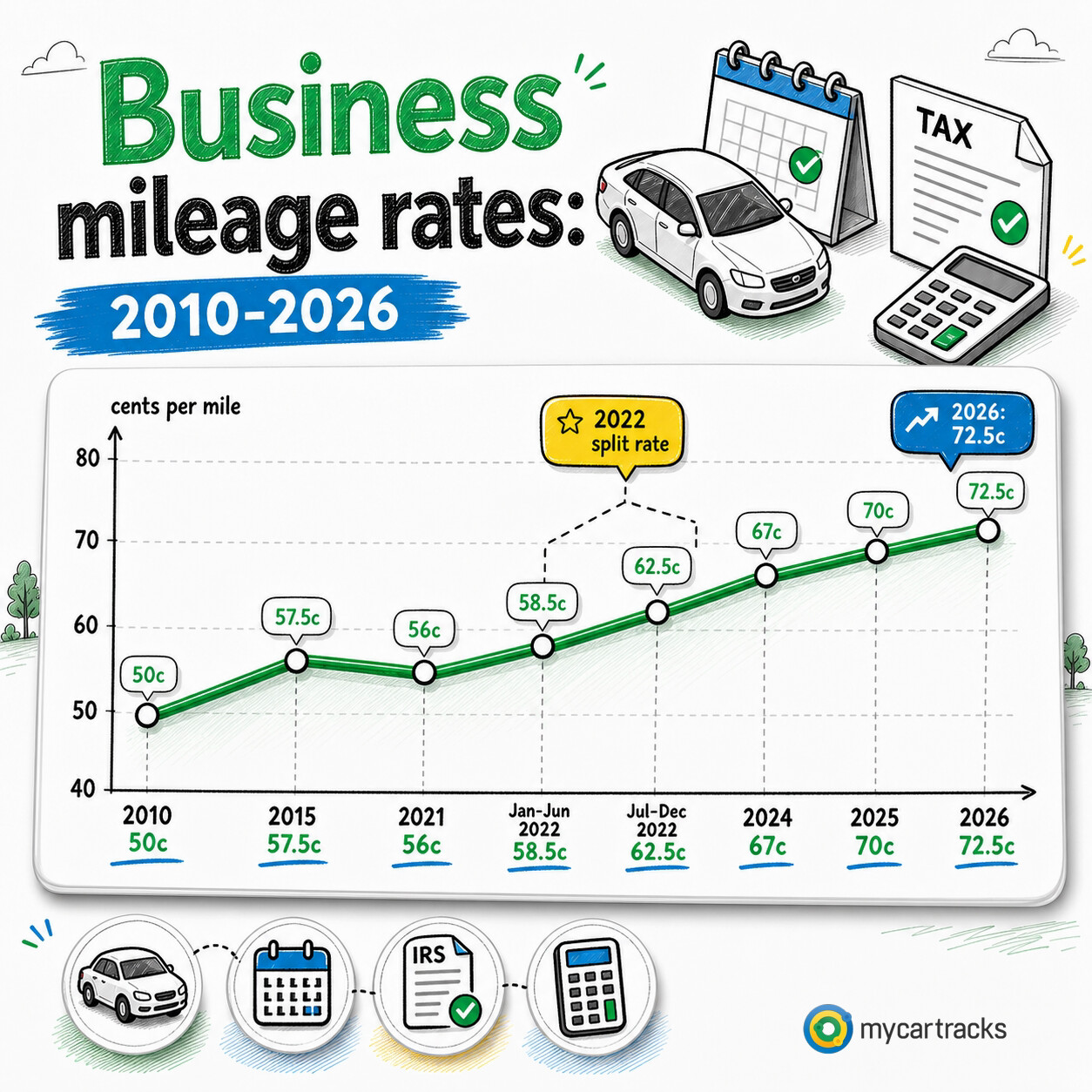
| 2026 | 72.5 cents | 20.5 cents | 14 cents |
| 2025 | 70 cents | 21 cents | 14 cents |
| 2024 | 67 cents | 21 cents | 14 cents |
| 2023 | 65.5 cents | 22 cents | 14 cents |
| July 1-Dec. 31, 2022 | 62.5 cents | 22 cents | 14 cents |
| Jan. 1-June 30, 2022 | 58.5 cents | 18 cents | 14 cents |
| 2021 | 56 cents | 16 cents | 14 cents |
| 2020 | 57.5 cents | 17 cents | 14 cents |
| 2019 | 58 cents | 20 cents | 14 cents |
| 2018 | 54.5 cents | 18 cents | 14 cents |
| 2017 | 53.5 cents | 17 cents | 14 cents |
| 2016 | 54 cents | 19 cents | 14 cents |
| 2015 | 57.5 cents | 23 cents | 14 cents |
| 2014 | 56 cents | 23.5 cents | 14 cents |
| 2013 | 56.5 cents | 24 cents | 14 cents |
| 2012 | 55.5 cents | 23 cents | 14 cents |
| July 1-Dec. 31, 2011 | 55.5 cents | 23.5 cents | 14 cents |
| Jan. 1-June 30, 2011 | 51 cents | 19 cents | 14 cents |
| 2010 | 50 cents | 16.5 cents | 14 cents |
| 2009 | 55 cents | 24 cents | 14 cents |
| July 1-Dec. 31, 2008 | 58.5 cents | 27 cents | 14 cents |
| Jan. 1-June 30, 2008 | 50.5 cents | 19 cents | 14 cents |
| 2007 | 48.5 cents | 20 cents | 14 cents |
| 2006 | 44.5 cents | 18 cents | 14 cents |
| 2005 | 40.5 cents | 15 cents | 14 cents |
| 2004 | 37.5 cents | 14 cents | 14 cents |
The table mixes full-year entries with the split-rate periods the IRS issued in 2011, 2022, and 2008. That is why older mileage reports sometimes need more than one line item even when the calendar year stayed the same.
Why the trip year matters more than the filing date
A 2026 spreadsheet does not turn a 2025 trip into a 2026-rate trip. The correct rate follows the date the miles were driven. That is true for tax deductions, reimbursement reviews, and reconstructed year-end reports. When one file crosses years, split it before you calculate anything.
Why the IRS changes mileage rates
The business and medical or moving rates are based on annual IRS cost studies rather than on a fixed permanent number. That is why they can rise, fall, or even change mid-year when costs move sharply. The charitable rate is different because it is set by statute, which is why it stays much flatter over time.
2026: business rate up 2.5 cents
For 2026, the business rate moved from 70 cents to 72.5 cents per mile. The medical and eligible moving rate moved from 21 cents to 20.5 cents, while the charitable rate stayed at 14 cents. If you are comparing 2026 reports with 2025 files, this is the first change to check.
2025: business rate up 3 cents
The 2025 business rate rose to 70 cents per mile after sitting at 67 cents in 2024. The medical and moving rate held at 21 cents, and the charitable rate remained 14 cents. For many employers, 2025 was the year their standard reimbursement template changed even if their approval workflow did not.
2024: smaller increase, same medical and charity rates
In 2024, the business rate increased to 67 cents per mile. The medical and moving rate stayed at 21 cents, and the charitable rate stayed at 14 cents. Compared with the bigger shifts around 2022 and 2023, 2024 was a steadier year.
2023: rate stayed elevated after the 2022 reset
The 2023 business rate was 65.5 cents per mile, with 22 cents for medical and moving and 14 cents for charity. For readers reviewing several recent years at once, 2023 often looks close to the second half of 2022 because the mid-year 2022 increase had already moved the rate sharply higher.
2022: two separate rate periods
2022 is the year readers most often price incorrectly. The business rate was 58.5 cents per mile from January 1 through June 30, then 62.5 cents from July 1 through December 31. The medical and moving rate also changed, from 18 cents to 22 cents. If you use one rate for the whole year, the file is wrong.
2021: lower travel costs pulled the rate down
The 2021 business rate was 56 cents per mile, with 16 cents for medical and moving and 14 cents for charity. Compared with the later jump in 2022, 2021 sits in the lower range of the recent table.
2020: business rate edged down
For 2020, the business rate was 57.5 cents per mile, the medical and moving rate was 17 cents, and the charitable rate was 14 cents. The year-over-year change was modest, but it still matters when an audit or reimbursement review reaches back several years.
2019: one of the sharper year-over-year increases
The 2019 business rate reached 58 cents per mile, up from 54.5 cents in 2018. The medical and moving rate rose to 20 cents, while the charitable rate stayed at 14 cents. If a company compared 2018 and 2019 reimbursements side by side, the cents-per-mile jump was noticeable.
2018: moving-expense eligibility narrowed
The 2018 business rate was 54.5 cents per mile and the medical and moving rate was 18 cents. That year also sits at the front edge of the long-running moving-expense restriction that narrowed who could use the moving category under federal law. If an older file includes moving mileage, verify eligibility before assuming the rate can be used.
Who can use each rate category
The business rate is the broadest and is the one most often used for self-employed deductions and employee reimbursements. The medical rate belongs to qualifying medical travel. The moving rate is much narrower and needs its own eligibility review for the year in question.
The charitable rate belongs to qualified charitable service and should not be mixed into business or payroll calculations. If you need the live-year snapshot, jump to Current IRS Mileage Rates for 2026. If your question is about nonbusiness categories, Medical and Charitable Mileage Rates is the better follow-up.
How mileage tracking and mileage logs help audit an older report
Start with the trip log, then check the trip dates, the rate source for that period, and whether the file mixes business, commuting, and personal miles.
After that, confirm whether the report crosses a split-rate period like 2022. If it does, break the calculation apart before you total anything. IRS Mileage Log Requirements is the next article to use when the rates are fine but the record itself is weak. If you want the broader product context behind year-by-year trip records and exports, use MyCarTracks.
Decision workflow
Use the same decision path before applying a rate or submitting a report:
- Identify the person or entity using the record: employee, employer, self-employed worker, volunteer, contractor, owner, or fleet manager.
- Identify the purpose: reimbursement, deduction, payroll support, job costing, customer billing, vehicle program review, or fleet reporting.
- Identify the tax year and the US rule set that applies. Do not mix business, medical, moving, charitable, reimbursement, and state-law rules in one calculation.
- Confirm whether the trip qualifies under the relevant source. A route can be real and still be personal, commuting, or outside the policy.
- Apply the rate, method, or program only after the trip record is complete.
- Save the source, report, approval, and payment record together.
That order matters. Many mileage errors happen because someone starts with a rate and then tries to make the trip fit it. A stronger workflow starts with the trip facts and uses the rate only at the calculation step.
Rate calculation workflow
For a rate-based calculation, keep the math transparent:
- source rate
- effective date
- qualifying distance
- excluded distance
- reimbursement or deduction purpose
- separate parking and tolls
- reviewer or approver
Example: 86.4 business miles at 72.5 cents per mile equals $62.64 before any separately handled parking or tolls. If part of the route was personal, remove that distance before multiplying. If the trip happened in a prior year, use the prior-year rate. If the report spans two rate periods, split the report.
Rates are useful because they standardize calculations. They are risky when people use them as shortcuts for eligibility. The official rate source should be saved with the article, policy, or reimbursement report.
Practical example
Suppose a driver submits a route from a customer site to a supplier and back to the office. First confirm the qualifying business distance, then apply the rate for the correct year and rule set. Parking and tolls should be supported separately rather than hidden inside the mileage number.
If the report spans two rate periods or two tax years, split it. Rate accuracy depends on clean trip facts, not only on copying the newest cents-per-mile figure.
Record quality standard
A mileage record is stronger when it can answer a skeptical review without the driver being present. The reviewer should be able to see the trip date, route or destination, distance, purpose, vehicle, category, and supporting documents. If the record depends on a vague memory such as “probably a client visit,” it is weak. If it points to a calendar entry, job ticket, customer, delivery, work order, reimbursement request, or receipt, it is much easier to trust.
For teams, a second quality standard matters: the report should be consistent across drivers. If one employee submits odometer readings, another submits rounded estimates, and another submits only fuel receipts, approvals become subjective. A shared format protects employees and employers because everyone knows what proof is expected before money or tax treatment is involved.
Source handling
Save the official source used for each rate, rule, or policy decision. For public articles, that means linking to the IRS or the relevant state source rather than repeating unsupported third-party claims. For internal company use, it means saving the policy version and source rate that were active when the trip was paid. This matters when a reader later asks why a 2026 trip was calculated differently from a 2025 trip, or why one state required a different reimbursement workflow from another state.
Review checklist
- Is the trip business, commuting, personal, medical, charitable, or another category?
- Is the rate from the correct tax year and rule set?
- Are different trip categories kept separate?
- Does the record name the vehicle and driver?
- Does the business purpose make sense without extra memory?
- Are parking, tolls, and other route costs handled separately?
- Are total annual vehicle miles needed?
- Is the reimbursement policy saved with the report?
- Are state-specific rules relevant?
- Is a professional review needed before filing, payroll, or policy decisions?
Operational notes
The cleanest mileage programs use a short feedback loop. Drivers review trips weekly. Managers approve or reject claims on a predictable schedule. Finance exports reports before closing the period. Policy owners review official rate changes at least annually. When each role owns a small part of the workflow, mileage records stay useful instead of becoming a year-end cleanup project.
The workflow should also have an exception lane. A missed trip, lost receipt, changed vehicle, late submission, temporary assignment, or unusual route should not be hidden in the normal report. Mark it, explain it, approve it separately, and keep the note with the record. Exceptions are normal; undocumented exceptions are what create risk.
For public-facing content, this operational layer is what raises the article above a definition page. Readers should leave knowing not only what the rule or rate is, but how to collect records, review them, correct problems, and produce a report that someone else can trust.
When to get professional review
Get tax, payroll, legal, or accounting review when the answer affects a filed return, employee wages, worker classification, taxable benefits, multi-state reimbursement, FAVR design, or a dispute over unpaid expenses. A mileage app can make the record cleaner, but it cannot decide the legal or tax treatment by itself.
Records to keep
Keep these records before a deadline or tax return forces the issue:
- date of each trip
- start and end location, destination, route, or client/job context
- business purpose
- distance driven
- vehicle used
- driver or employee name when a team is involved
- total odometer readings where required
- receipts for fuel, charging, repairs, parking, tolls, insurance, registration, and other vehicle costs
- reimbursement requests, approvals, denials, and employer policy documents
- tax-year rate source used for each calculation
Common mistakes
- using the current rate for an older tax year
- mixing commuting, personal errands, and business miles
- saving only payout, calendar, or bank records without a mileage log
- forgetting total annual miles when actual expenses or business-use percentages matter
- treating an employer reimbursement policy as if it were a tax rule
- treating a tax rule as if it were an employer reimbursement promise
- missing parking, tolls, support trips, return trips, and supply runs
- waiting until tax season to explain routes from memory
FAQ
Can I use the newest IRS rate for older miles?
No. Use the rate that applied when the miles were driven. A 2026 reimbursement template does not change a 2025 or 2022 trip into a 2026-rate trip.
Why does 2022 show two different rates?
The IRS issued a mid-year update that changed the business and medical or moving rates effective July 1, 2022. Reports that span both halves of the year need two calculation periods.
What if one mileage report covers more than one tax year?
Split the report by trip date before applying the rate. Save the source for each year so the math can be checked later.
Why does the charitable rate change so rarely?
The charitable mileage rate is set by statute, so it does not move with the same annual cost study that drives the business rate.
How far back should I keep the rate source?
Keep the official source for any year that still affects an open reimbursement review, amended return, audit file, or unresolved payroll question.
MyCarTracks workflow
Use MyCarTracks as the trip record layer, then let the tax, payroll, or accounting workflow decide how the records are used.
- Record trips automatically.
- Classify business and personal driving while the trip is still fresh.
- Add tags for employee, vehicle, client, project, platform, or state.
- Review mileage weekly so personal stops and unclear routes are fixed early.
- Export reports by tax year, pay period, vehicle, driver, or reimbursement cycle.
What to read next
- What Is a Mileage Log?
- IRS Mileage Log Requirements
- Standard Mileage Rate vs Actual Expenses
- What Is Mileage Reimbursement?
Sources
- IRS standard mileage rates
- IRS 2026 standard mileage rate announcement
- IRS Publication 463
- IRS Topic 455, Moving expenses
- IRS Internal Revenue Bulletin 2026-04
- IRS 2005 standard mileage rates announcement (shows 2004 prior-year rates)
- IRS Internal Revenue Bulletin 2004-49
- IRS Internal Revenue Bulletin 2005-51
- IRS Internal Revenue Bulletin 2006-47
- IRS Internal Revenue Bulletin 2007-50
- IRS Internal Revenue Bulletin 2008-28
- IRS Internal Revenue Bulletin 2009-51