Business miles and commuting miles are not the same thing, even when both happen on a workday. The classification decides whether a trip can support a deduction, whether an employee can be reimbursed tax-free, and whether the mileage record makes sense when someone reviews it later.
The federal starting point is IRS Publication 463, and the 2026 IRS mileage-rate announcement only matters after the trip is classified correctly. If you want mileage tracking to capture the route before memory fades, MyCarTracks automatic mileage tracking can help you keep business, commuting, and personal driving separated while the details are still easy to explain.
This article is educational and is not tax, legal, payroll, employment, or financial advice. Mileage rules change by federal tax treatment, state law, employer policy, vehicle program, and tax year. Check the official source and a qualified professional before relying on a calculation.
Quick answer
Business miles are qualifying work trips outside ordinary commuting. Commuting miles are usually personal travel between home and a regular work location, which means they normally do not support a deduction or a tax-free reimbursement. The safest habit is to classify the trip before you total the miles.
What counts as business miles
Business miles are the trips that support an actual business purpose outside ordinary commuting. Common examples include client meetings, vendor visits, conferences, temporary work locations, site visits, supply runs, and travel between jobsites during the day.
The trip still needs a business reason strong enough to survive review. If you drove partly for personal reasons, split the route instead of treating the whole drive as business just because work happened somewhere along the way.
What counts as commuting miles
Commuting miles are usually the ordinary trips between home and a regular work location. That is why a drive can feel work-related to the driver and still be treated as personal for tax and reimbursement purposes.
Commuting usually stays out of the deductible and tax-free reimbursement file, and related costs such as ordinary commute parking or tolls generally stay out with it. Even calls, podcasts, or planning done during the drive do not automatically turn a commute into business mileage.
Business miles and commuting miles do not lead to the same result
The classification changes the outcome:
| Category | Tax-free reimbursement | Deduction potential | Typical example |
|---|---|---|---|
| Business miles | often yes when the policy and records fit | often yes when the taxpayer qualifies | drive from an office to a client, supplier, or temporary jobsite |
| Commuting miles | generally no | generally no | drive from home to a regular office and back |
That is why a mileage total is never enough by itself. The reviewer needs to know what kind of trip created the miles before the rate table matters.
Exceptions and gray areas
Some trips need a closer read. Travel between multiple jobsites during the day, temporary assignments, mixed-purpose routes, and home-office situations can change the answer.
If home qualifies as your principal place of business under the applicable tax rules, later trips from home to clients or temporary worksites may be treated differently from an ordinary commute. If that question is unsettled, keep the details and get tax or payroll advice before you classify the whole route with confidence.
What employers need to know about commuting miles
Employers should keep commuting out of ordinary mileage reimbursements unless the payment is intentionally handled as taxable compensation or another approved commuter benefit. If commuting is treated like reimbursable business travel by mistake, payroll and tax reporting can become wrong even when the miles themselves are real.
Some companies require each employee’s actual commute to be excluded. Others use a policy-based commute deduction or a different workflow for field staff. The important part is that the policy says what happens before claims start arriving. Mileage Reimbursement Rules for Employers and How to Create a Mileage Reimbursement Policy go deeper on that policy layer.
What drivers and self-employed people need to know
Drivers need the same separation for a different reason. If an employee submits commute miles as reimbursable business travel, the claim can become taxable or get rejected. If a self-employed person claims commute miles as deductible business mileage, the tax return can become inaccurate.
That is why the category line matters before the math. How to Claim Mileage on Taxes and Self-Employed Mileage Deduction Rules are the next steps when you need the filing consequences after the trip has been classified.
How to avoid reimbursing or deducting commutes by mistake
The safest approach is a written rule and a repeatable review habit. Define commuting clearly in the policy, ask employees to label ambiguous first and last trips, and return unclear reports while the route is still fresh enough to explain.
If you manage a team with recurring routes, choose one approach and document it: actual commute exclusion, role-specific examples, or a policy-based adjustment. Do not let each manager invent a different commute rule from memory.
Mileage tracking habits that keep categories clean
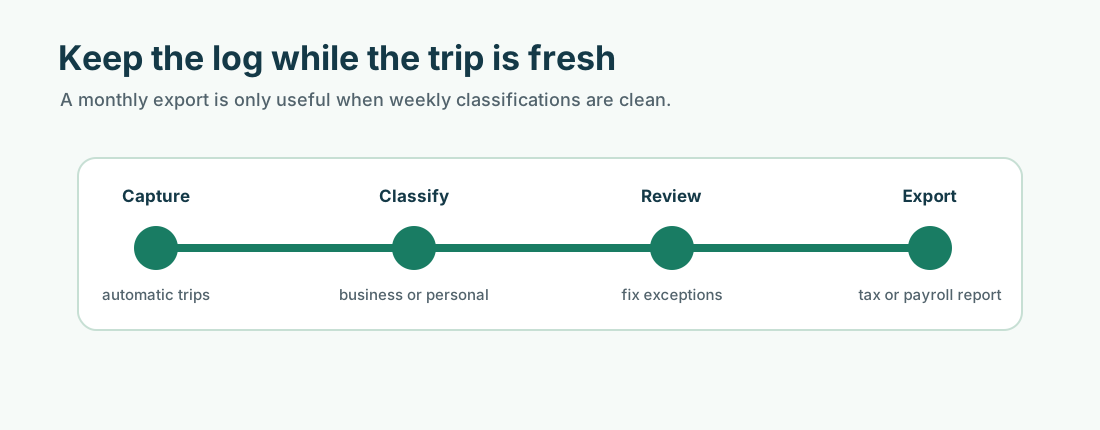
Keep the trip date, total mileage, start and end points or route, and business purpose for every potentially deductible or reimbursable drive. Then review the route before the details fade and classify it as business, commuting, personal, medical, charitable, or another category.
Manual logs can work, but they make edge cases easier to misremember. What Is a Mileage Log?, IRS Mileage Log Requirements, and How to Track Mileage for Tax Deductions show what a stronger file looks like.
Not every workday mile is a business mile
A drive can happen on a workday and still belong in the personal column. That is the real lesson behind the business-versus-commuting split. The work calendar does not decide the category by itself; the trip purpose and the route context do.
If you want the broader product view behind automatic trip capture, weekly review, and export-ready reports, use the MyCarTracks homepage.
Decision workflow
Use the same decision path before applying a rate or submitting a report:
- Identify the person or entity using the record: employee, employer, self-employed worker, volunteer, contractor, owner, or fleet manager.
- Identify the purpose: reimbursement, deduction, payroll support, job costing, customer billing, vehicle program review, or fleet reporting.
- Identify the tax year and the US rule set that applies. Do not mix business, medical, moving, charitable, reimbursement, and state-law rules in one calculation.
- Confirm whether the trip qualifies under the relevant source. A route can be real and still be personal, commuting, or outside the policy.
- Apply the rate, method, or program only after the trip record is complete.
- Save the source, report, approval, and payment record together.
That order matters. Many mileage errors happen because someone starts with a rate and then tries to make the trip fit it. A stronger workflow starts with the trip facts and uses the rate only at the calculation step.
Mileage deduction workflow
For deduction topics, separate eligibility from arithmetic. A taxpayer may have a perfect mileage total and still need to confirm whether they can use the standard mileage method, whether a trip is commuting, whether actual expenses are better supported, or whether employee expense limits apply.
The record should show business miles, total miles where needed, vehicle used, trip purpose, receipts, reimbursement received, and the tax year. If a reimbursement already covered a cost, the tax treatment needs review before the same cost is treated as deductible.
A deduction article should also help readers avoid double counting. Parking, tolls, depreciation, lease costs, fuel, and repairs do not all fit the same way under every method. A simple export can become misleading if it does not show which method the taxpayer intends to use.
Self-employed monthly file
For self-employed readers, a good monthly file includes mileage reports, income records, receipts, bank deposits, reimbursement records, and notes for unusual trips. That file should be organized before year-end. Waiting until filing time usually turns a simple mileage question into a reconstruction project.
Practical example
Suppose a self-employed consultant drives to client meetings, a bank, a supply store, and a personal appointment on the same day. The mileage record should separate business legs from personal driving and preserve receipts for costs that may be handled outside the standard mileage calculation.
The tax result depends on eligibility and method, not only distance. Keep the trip log, income records, receipts, and rate source together before filing.
Record quality standard
A mileage record is stronger when it can answer a skeptical review without the driver being present. The reviewer should be able to see the trip date, route or destination, distance, purpose, vehicle, category, and supporting documents. If the record depends on a vague memory such as “probably a client visit,” it is weak. If it points to a calendar entry, job ticket, customer, delivery, work order, reimbursement request, or receipt, it is much easier to trust.
For teams, a second quality standard matters: the report should be consistent across drivers. If one employee submits odometer readings, another submits rounded estimates, and another submits only fuel receipts, approvals become subjective. A shared format protects employees and employers because everyone knows what proof is expected before money or tax treatment is involved.
Source handling
Save the official source used for each rate, rule, or policy decision. For public articles, that means linking to the IRS or the relevant state source rather than repeating unsupported third-party claims. For internal company use, it means saving the policy version and source rate that were active when the trip was paid. This matters when a reader later asks why a 2026 trip was calculated differently from a 2025 trip, or why one state required a different reimbursement workflow from another state.
Review checklist
- Is the trip business, commuting, personal, medical, charitable, or another category?
- Is the rate from the correct tax year and rule set?
- Are different trip categories kept separate?
- Does the record name the vehicle and driver?
- Does the business purpose make sense without extra memory?
- Are parking, tolls, and other route costs handled separately?
- Are total annual vehicle miles needed?
- Is the reimbursement policy saved with the report?
- Are state-specific rules relevant?
- Is a professional review needed before filing, payroll, or policy decisions?
Operational notes
The cleanest mileage programs use a short feedback loop. Drivers review trips weekly. Managers approve or reject claims on a predictable schedule. Finance exports reports before closing the period. Policy owners review official rate changes at least annually. When each role owns a small part of the workflow, mileage records stay useful instead of becoming a year-end cleanup project.
The workflow should also have an exception lane. A missed trip, lost receipt, changed vehicle, late submission, temporary assignment, or unusual route should not be hidden in the normal report. Mark it, explain it, approve it separately, and keep the note with the record. Exceptions are normal; undocumented exceptions are what create risk.
For public-facing content, this operational layer is what raises the article above a definition page. Readers should leave knowing not only what the rule or rate is, but how to collect records, review them, correct problems, and produce a report that someone else can trust.
When to get professional review
Get tax, payroll, legal, or accounting review when the answer affects a filed return, employee wages, worker classification, taxable benefits, multi-state reimbursement, FAVR design, or a dispute over unpaid expenses. A mileage app can make the record cleaner, but it cannot decide the legal or tax treatment by itself.
Records to keep
Keep these records before a deadline or tax return forces the issue:
- date of each trip
- start and end location, destination, route, or client/job context
- business purpose
- distance driven
- vehicle used
- driver or employee name when a team is involved
- total odometer readings where required
- receipts for fuel, charging, repairs, parking, tolls, insurance, registration, and other vehicle costs
- reimbursement requests, approvals, denials, and employer policy documents
- tax-year rate source used for each calculation
Common mistakes
- using the current rate for an older tax year
- mixing commuting, personal errands, and business miles
- saving only payout, calendar, or bank records without a mileage log
- forgetting total annual miles when actual expenses or business-use percentages matter
- treating an employer reimbursement policy as if it were a tax rule
- treating a tax rule as if it were an employer reimbursement promise
- missing parking, tolls, support trips, return trips, and supply runs
- waiting until tax season to explain routes from memory
MyCarTracks workflow
Use MyCarTracks as the trip record layer, then let the tax, payroll, or accounting workflow decide how the records are used.
- Record trips automatically.
- Classify business and personal driving while the trip is still fresh.
- Add tags for employee, vehicle, client, project, platform, or state.
- Review mileage weekly so personal stops and unclear routes are fixed early.
- Export reports by tax year, pay period, vehicle, driver, or reimbursement cycle.
What to read next
- What Is a Mileage Log?
- IRS Mileage Log Requirements
- Standard Mileage Rate vs Actual Expenses
- What Is Mileage Reimbursement?