If you are self-employed and drive for work, the mileage deduction matters because vehicle use can be one of the largest recurring costs in the business. The deduction only works well when the trip record and the filing record tell the same story.
That filing path usually starts with Schedule C and can continue to Schedule SE when self-employment tax applies. The IRS self-employed tax center and Publication 463 are the official anchors for the mileage and vehicle-expense rules.
If the recordkeeping side is the real problem, MyCarTracks automatic mileage tracking can help you keep business trips, personal trips, and export-ready mileage logs separated throughout the year.
This article is educational and is not tax, legal, payroll, employment, or financial advice. Mileage rules change by federal tax treatment, state law, employer policy, vehicle program, and tax year. Check the official source and a qualified professional before relying on a calculation.
Quick answer
Self-employed filers usually deduct qualifying vehicle use through either the standard mileage method or the actual expense method. To do that safely, track business trips throughout the year, separate commuting and personal driving, keep total annual miles when needed, and save the receipts that support the method you choose.
Who this guide is for
This guide is for people who drive as part of work they report as self-employment income, including:
- sole proprietors
- freelancers
- independent contractors
- gig workers
- single-member LLC owners filing through the individual return
If your work driving belongs to an employer reimbursement program instead, use What Is Mileage Reimbursement? or Mileage Reimbursement Rules for Employees instead of forcing reimbursement questions into a deduction workflow.
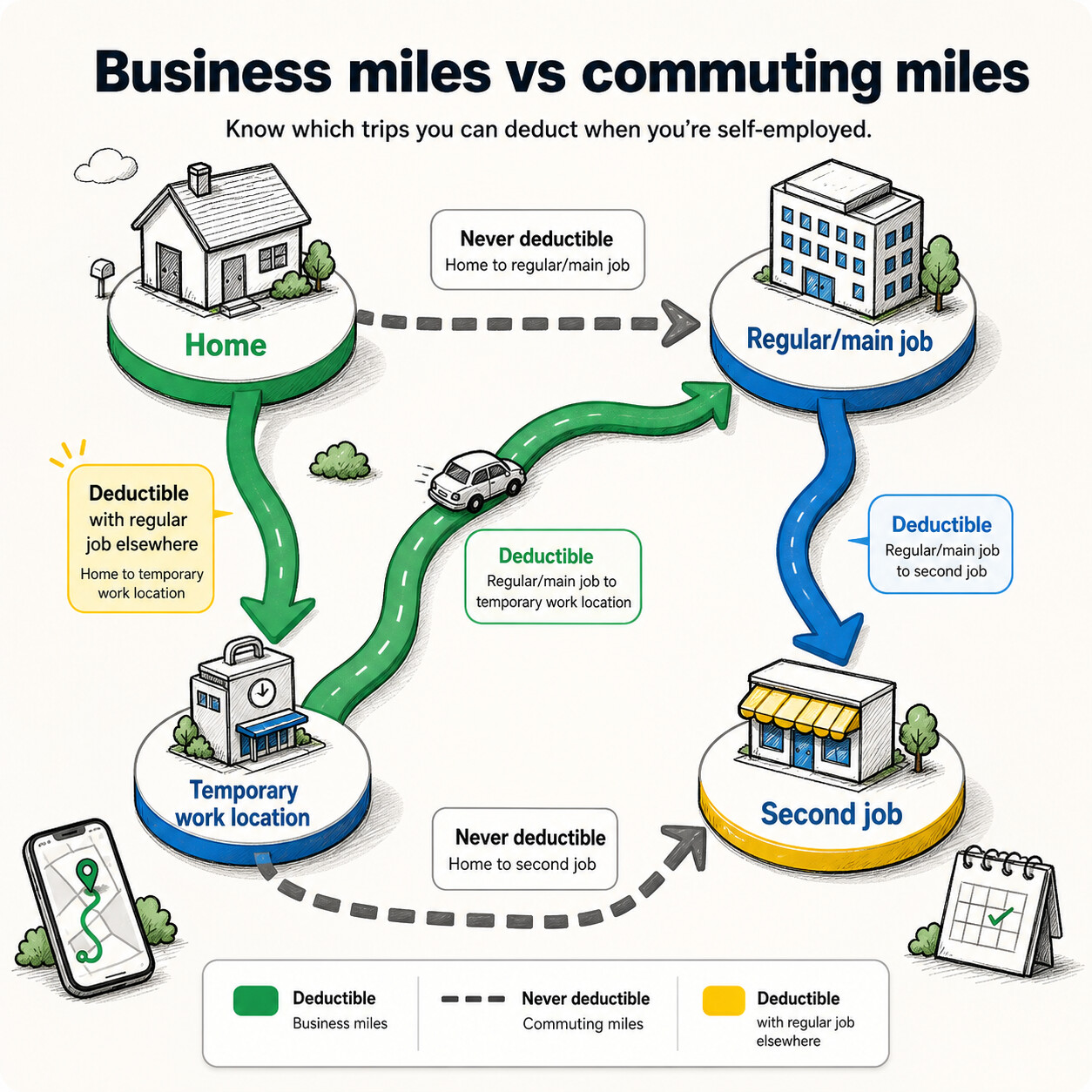
Trips that count as business mileage
Self-employed business mileage is usually about the purpose of the trip, not whether the trip happened on a workday.
Common qualifying examples include:
- driving between two work locations
- visiting clients or customers
- going to job sites
- running business errands, such as supply runs or bank trips for the business
- driving from home to another work location when the home qualifies as your principal place of business
- driving to a temporary workplace in situations where the federal transportation rules allow it
If you are still working through the business-versus-commuting split, Business Miles vs Commuting Miles is the best companion article.
Trips that usually do not count
Self-employed status does not make every mile deductible.
Common nondeductible trips include:
- ordinary commuting between home and a regular workplace
- personal errands
- mixed-purpose trips where the business reason is weak or undocumented
- routes that start as business and become personal without a clean split in the record
Carrying tools or showing ads does not fix a commute
Two common myths survive longer than they should. Bringing tools in the vehicle does not automatically turn a commute into business mileage. Displaying advertising on the vehicle does not do it either. If the route is still ordinary home-to-regular-work commuting, the deduction usually does not appear just because the vehicle was work-related in some broader sense.
Choose between the two methods
Self-employed filers generally choose between the standard mileage method and the actual expense method.
That choice affects not only the size of the deduction but also the size of the recordkeeping file. If you need the pure side-by-side comparison before you go deeper here, read Standard Mileage Rate vs Actual Expenses.
Standard mileage rate method
The standard mileage method multiplies qualifying business miles by the federal rate for the year the miles were driven.
For 2026, the IRS business mileage rate is 72.5 cents per mile under the 2026 rate announcement. Parking fees and tolls for qualifying business trips can still be handled separately.
When you can use the standard mileage method
Publication 463 explains the main limits. The standard mileage method is generally unavailable if you:
- use five or more cars at the same time for business
- claimed a Section 179 deduction on the car
- claimed the special depreciation allowance on the car
- claimed depreciation using a method other than straight line
- claimed actual expenses after 1997 for a leased car
For a vehicle you own, you generally need to choose the standard mileage method in the first year the vehicle is available for business use if you want the method to stay available later. For a leased car, using the standard mileage method usually means staying with it for the lease period.
Actual expense method
The actual expense method uses the business-use share of the real costs of owning and operating the vehicle.
Costs that can be part of actual expenses
Publication 463 lists vehicle costs that can fall into the actual-expense file, including:
- depreciation or lease payments
- gas and oil
- tires
- repairs
- insurance
- registration fees and licenses
- parking fees and tolls
- some other vehicle costs that are properly documented and connected to business use
When depreciation can lock you out later
Depreciation choices can restrict future use of the standard mileage method. That is why the first-year decision deserves more attention than many self-employed filers give it. A bigger deduction this year can narrow your later options for the same vehicle.
How to choose between the methods
Standard mileage is often the cleaner fit when you want a predictable routine and ordinary vehicle costs. Actual expenses are more attractive when the vehicle is expensive to own or operate and the records are already disciplined enough to support the larger file.
Can you switch later?
Sometimes, but not always. Switching depends on how the vehicle was treated in the first year, what kind of depreciation was claimed, and whether the vehicle is owned or leased. Do not assume a later switch is automatically available just because the numbers changed.
Mileage tracking records you need to keep
Mileage tracking is the core record for both methods. The actual expense method simply asks more of the same file.
For the standard mileage method
Keep a timely mileage log with:
- trip date
- distance
- destination or route
- business purpose
- vehicle used
It also helps to keep starting and ending odometer readings for the year so the annual vehicle story is easy to follow.
For the actual expense method
Keep the same mileage log, then add the receipts and support documents for the vehicle costs you want to include. That usually means insurance, repairs, registration, lease payments or depreciation support, and any other operating cost that belongs in the business-use percentage calculation.
This is where IRS Mileage Log Requirements, How to Track Mileage for Tax Deductions, and IRS Receipt Requirements for the Self-Employed work best together.
How to calculate the deduction
Once the records are clean, the formulas are straightforward.
Standard mileage method example
If you drove 2,000 qualifying business miles in 2026 and use the 2026 business rate of 72.5 cents per mile, the deduction would be:
2,000 x $0.725 = $1,450
Actual expense method example
If your annual vehicle costs were $5,000 and your mileage log shows 2,000 business miles out of 5,000 total miles for the year, your business-use percentage is 40%. The deduction would be:
$5,000 x 40% = $2,000
The better method is not the one with the prettier formula. It is the one you qualify for and can support with records.
Special workplace situations
Some mileage questions depend on how and where the work is organized, not just on who paid for the gas.
If your home qualifies as your principal place of business
When a home office qualifies under the federal rules, travel between home and another work location in the same trade or business can be treated differently from an ordinary commute. The home office itself needs to qualify first, which is why Publication 587 matters here.
If you have no regular workplace
The federal transportation rules can also treat some temporary workplace travel differently, especially when there is no regular place of work or the temporary workplace sits outside the metropolitan area where you live. That is a fact-heavy question, so keep the trip details clean before you classify the route.
If you operate a carpool
Nonprofit carpools do not automatically create a deduction. If you operate a carpool for profit, the income and the vehicle-cost treatment need to be handled consistently in the tax file rather than guessed at route by route.
Other self-employed records in the same tax file
Mileage is often the largest recurring deduction, but it is rarely the only one in the return.
The same self-employed file may also need:
- estimated-tax planning through the IRS estimated taxes page
- a broader deduction review in Self-Employed Tax Deductions
- filing workflow support from How to Claim Self-Employed Taxes
- separate review for self-employed health insurance or home-office deductions when those issues apply
Keeping those items in one year-end folder prevents mileage from being treated like the whole return.
Common mistakes
- counting commuting as business mileage
- using standard mileage without a mileage log
- forgetting total annual miles when using actual expenses
- assuming tools or advertising on the vehicle make a commute deductible
- choosing depreciation without considering future method limits
- saving receipts but not the trip purpose behind the miles
- waiting until year-end to explain routes from memory
FAQ
Can I deduct mileage to and from work?
Usually not for ordinary commuting. Some qualifying home-office and temporary workplace situations can change the analysis, but they do not erase the need for a clear business purpose and a clean trip record.
Is there a limit on how many self-employed business miles I can deduct?
There is no simple mileage cap by itself. The issue is whether the miles were genuinely deductible and well documented.
If I use the standard mileage method, what else can I deduct?
Parking fees and tolls for qualifying business trips can still matter. They should stay clearly separated from the mileage line.
Is actual expense always better for self-employed filers?
No. It can produce a larger deduction in some situations, but it also creates more recordkeeping and more opportunities for mistakes.
MyCarTracks workflow
Use MyCarTracks to keep the self-employed mileage file usable before the tax return is due.
- Capture trips throughout the year instead of rebuilding them at filing time.
- Review routes weekly so commuting and personal use do not bleed into the business total.
- Export tax-year reports by vehicle before you compare standard mileage with actual expenses.
- Store the mileage report with receipts, annual totals, and the official source pages used for the filing decision.
If you need the broader reporting and logbook view behind that workflow, see MyCarTracks and the reporting sections on the features page.
What to read next
- How to Claim Mileage on Taxes
- Standard Mileage Rate vs Actual Expenses
- Business Miles vs Commuting Miles
- How to Track Mileage for Tax Deductions