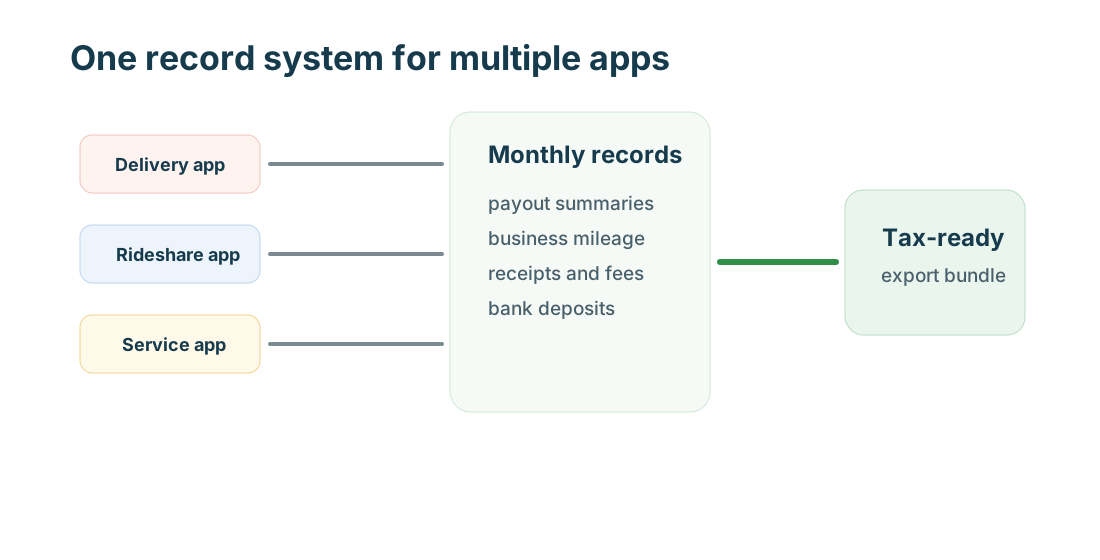
Multi-app work can be profitable, but it gets messy fast. The key is to tag every mile, payout, receipt, and document by platform before the month ends.
Quick answer
Use separate tags for each platform, reconcile payouts monthly, export mileage by vehicle and platform, and keep tax forms with your own records. Do not rely on bank deposits alone, because one deposit can hide tips, fees, refunds, incentives, and timing differences.
Records
Your record system should answer:
- which platform created the income
- which vehicle and route created the miles
- which expense supported which platform or job
- which documents were required for each account
- which tax forms or summaries arrived at year-end
What to keep
Keep:
- weekly and monthly platform statements
- bank deposits
- mileage logs by platform
- receipts by category
- tax forms
- insurance, inspection, permit, and license records
- support messages and corrections
- return, refund, cancellation, or deactivation records
- screenshots for app changes that affect pay or access
Workflow
Weekly: review trips, attach receipts, and fix platform tags. Monthly: compare app statements to deposits, export mileage, and total expenses. Quarterly: estimate tax cash needs and review profit by platform. Yearly: download tax forms and annual summaries.
Audit-ready folder
Use folders for income, mileage, expenses, tax forms, documents, insurance, support, and exports. Inside each folder, use platform names so Uber, DoorDash, Instacart, Airbnb, Thumbtack, Wag, and private work stay separate.
Common gaps
- one mileage tag for every app
- deposits with no statement attached
- receipts with no business purpose
- trips that switch platforms without splitting
- support messages lost inside apps
- no total vehicle miles
- tax forms saved without annual summaries
Profit review
Compare platforms by net profit, not by gross pay. Rideshare may have high revenue but more deadhead miles. Delivery may have lower revenue but flexible routing. Grocery shopping can add unpaid store time. Local services may have lead costs. Hosting has property expenses. The right platform depends on your market and vehicle.
Naming system
Use predictable names for files and notes: date, platform, category, and purpose. Examples include 2026-04-21-doordash-toll, 2026-04-21-uber-airport-mileage, 2026-04-airbnb-cleaning, or 2026-q1-instacart-statements. The name should make sense without opening the file.
Multi-app mileage
Multi-app driving is where records break down. If you finish an Uber Eats delivery and immediately accept DoorDash, split the route. If you wait with several apps open, note which platform created the next paid trip. If a route serves two platforms, keep enough notes to avoid double counting.
Deposit reconciliation
Bank deposits are not enough. One deposit may include several days of work, tips, incentives, refunds, instant-pay fees, and corrections. Reconcile app statements to bank deposits monthly so tax forms do not surprise you later.
Expense allocation
Some costs belong to one platform, such as a specific background check or local permit. Others are shared, such as phone service, mileage tracking, bags, or insurance. Use a consistent allocation method and document it. A simple note is better than guessing during filing.
Review dashboard
Each month, compare gross pay, net deposits, miles, hours, expenses, and problems by platform. Keep platforms that produce reliable net profit and reduce work that creates support issues, high unpaid mileage, or weak tips.
Example monthly closeout
A practical monthly closeout has one row per platform: gross income, net deposits, tips, incentives, refunds, fees, miles, hours, fuel or charging, tolls, parking, supplies, and open support issues. Add a notes column for unusual items such as a deactivation warning, denied refund, high-mileage route, or missing tax form.
The closeout does not need to be complicated. It needs to be consistent. When the same report is updated every month, year-end filing becomes a review instead of a reconstruction project.
Support and dispute records
Multi-app workers should also save support records. A denied delivery adjustment, a rideshare cleaning fee, an Airbnb refund, a Thumbtack lead refund, or a missing grocery tip can change income. Save the message, date, platform, amount, and final result.
Tax-form cross-check
At year-end, compare every tax form against monthly totals. If a platform form is lower than your own records, check for no-form income or missing months. If it is higher, check gross reporting, refunds, and fees.
MyCarTracks workflow
Use MyCarTracks platform tags and review them weekly. Export by vehicle and date range, then match the mileage report to platform statements and receipts.

Final review
A clean monthly closeout is easier than fixing twelve months at once.
What to read next
- Gig Guides: Taxes, Mileage, and Platform Guides for Gig Workers
- Gig Mileage Tracking Guide for the US, Canada, and Europe
- Gig Work Tax Guide for the US, Canada, and Europe
- How to Track Income and Expenses Across Multiple Gig Apps
- Gig Platform Availability in the US, Canada, and Europe