Mileage tracking and gig taxes are manageable when records are organized before tax season. The hard part is not one form; it is reconciling many platforms, deposits, miles, receipts, fees, and regional rules.
Quick answer: mileage tracking and tax records
Track all taxable income, keep mileage and expense records, download tax forms and annual summaries, and review estimated-tax needs during the year. A tax form is a summary, not the whole tax file. Income can still be taxable even when no form arrives.
Income
Track platform payouts, tips, incentives, bonuses, cancellation fees, adjustments, reimbursements, direct payments, cash, checks, processor deposits, and refunds. Keep gross income separate from net deposits so fees and withheld amounts are visible.
Tax records
Keep annual summaries, monthly statements, 1099-style forms or local equivalents, bank deposits, receipts, mileage exports, insurance, permits, support messages, and correction notices. The goal is to explain why gross platform totals differ from bank deposits and taxable profit.
Mileage
Mileage can be one of the largest gig-work records. Track date, route, distance, vehicle, platform, and business purpose. For 2026, the IRS business standard mileage rate is 72.5 cents per mile. Canada and Europe require their own records and business-use calculations.
Records
Build one tax-year folder with:
- income by platform
- mileage by vehicle
- expenses by category
- tax forms and annual summaries
- bank deposits
- document renewals
- support and correction messages
- regional tax records such as VAT, GST/HST, tourist tax, or local registration
United States
US gig workers commonly handle 1099-style forms, Schedule C-style expense records where applicable, self-employment tax, and estimated tax. IRS estimated-tax periods for calendar-year taxpayers generally lead to due dates of April 15, June 15, September 15, and January 15 of the following year. For 2026, Publication 505 lists April 15, 2026; June 15, 2026; September 15, 2026; and January 15, 2027.
The IRS 1099-K reporting threshold has reverted to more than $20,000 and more than 200 transactions for third-party settlement organizations, but that threshold is only a reporting rule. It does not decide whether income is taxable.
Canada
Canadian gig workers should keep business income, receipts, total kilometres, business kilometres, and GST/HST records when relevant. Finance Canada announced 2026 automobile allowance limits of 73 cents per kilometre for the first 5,000 kilometres and 67 cents after that for tax-exempt employee allowances. Self-employed vehicle claims still need business-use records and receipts. For Canada-specific gig tax handling, start with GST/HST for Gig Drivers (Canada) and then use the platform tax page for your app.
Europe
European gig workers should follow country-specific rules for VAT, invoices, social contributions, platform reporting, worker status, and vehicle expenses. EU platform-work developments do not replace local tax filing.
Common mistakes
- reporting only forms and missing no-form income
- using deposits as gross income
- estimating mileage at year-end
- forgetting platform fees, refunds, tolls, parking, and supplies
- mixing personal and business expenses
- not setting aside tax cash
- not downloading forms before filing
- ignoring Canada, Europe, state, province, or city rules
Estimated tax workflow
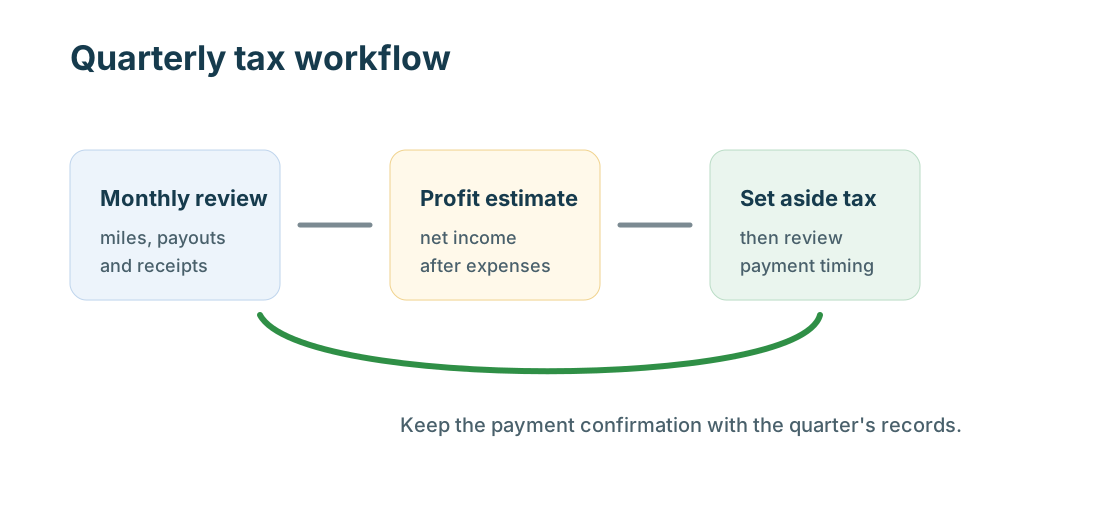
Monthly, estimate profit: income minus fees, mileage or vehicle costs, supplies, phone, insurance, permits, and other expenses. Quarterly, decide whether a payment is needed under local rules. Yearly, reconcile estimates with final forms and reports.
Gross income versus deposits
Gross income is the amount earned before fees, refunds, and some adjustments. A bank deposit is the money that arrived after platform timing and deductions. Tax forms may use gross numbers. Profit review uses gross income minus real expenses. Keep all three views so numbers can be reconciled.
1099-K and no-form income
The IRS says the 1099-K threshold for third-party settlement organizations has reverted to more than $20,000 and more than 200 transactions. That does not mean income below the threshold is tax-free. It means a form may not be issued. Keep your own statements and deposits.
What to download
Download monthly statements, annual summaries, tax forms, payout reports, mileage exports, fee summaries, and support messages. For Airbnb and local services, also download reservation, invoice, property, lead, and claim records. For rideshare and delivery, save trip, route, adjustment, and incentive records.
Expense categories
Common categories include mileage, actual vehicle expenses, tolls, parking, phone, platform fees, supplies, tools, insurance, licenses, permits, cleaning, software, tax preparation, and professional fees. Hosts and local service pros may also need property, lead-cost, material, and subcontractor categories.
Filing preparation
Before filing, compare platform forms with your own totals. Flag mismatches caused by refunds, deposits that crossed year-end, duplicate payments, cash income, processor fees, or corrected forms. A short note attached to the tax file can save hours later.
Platform-specific tax differences
Rideshare and delivery workers usually focus on vehicle costs, platform statements, tips, and 1099-style forms. Grocery shoppers add shopping time, carts, bags, and returns. Hosts add property expenses, local taxes, owner stays, and reservation records. Local service pros add lead fees, estimates, materials, permits, and invoices.
Monthly tax review
A monthly tax review should total income, mileage, expenses, deposits, and tax cash set aside. It should also list missing receipts, missing platform statements, and unresolved support cases. Fixing one month at a time is easier than fixing a full year.
MyCarTracks workflow
Use MyCarTracks automatic mileage tracking exports as the mileage evidence in your tax folder. Match monthly mileage reports to platform income, receipts, and tax forms before filing.
What to read next
- Gig Guides: Taxes, Mileage, and Platform Guides for Gig Workers
- GST/HST for Gig Drivers (Canada)
- Mileage Tracking App Checklist (Canada)
- Gig Mileage Tracking Guide for the US, Canada, and Europe
- How to Track Income and Expenses Across Multiple Gig Apps