Spreadsheets and emailed mileage forms can be enough at the start. They become harder to trust when drivers use different formats, managers approve claims in different ways, and finance has to rebuild the story behind rounded monthly totals. Grey fleet mileage tracking software should make the routine work easier without turning personal vehicles into company-car telematics.
For UK employers, the question is not just whether a tool can track location. It is whether it helps drivers record the right business journeys, submit only what belongs in a claim, and give managers enough detail for approval, HMRC mileage records, HSE road-risk workflows, and UK GDPR-sensitive privacy expectations. The ICO worker-monitoring guidance is the official privacy starting point for employee monitoring questions.
This guide is for UK employers, finance teams, HR teams, operations managers, fleet administrators, and office administrators choosing software for a shared grey-fleet workflow. It is educational only and is not tax, payroll, HSE, legal, employment, insurance, or data-protection advice.
Quick answer
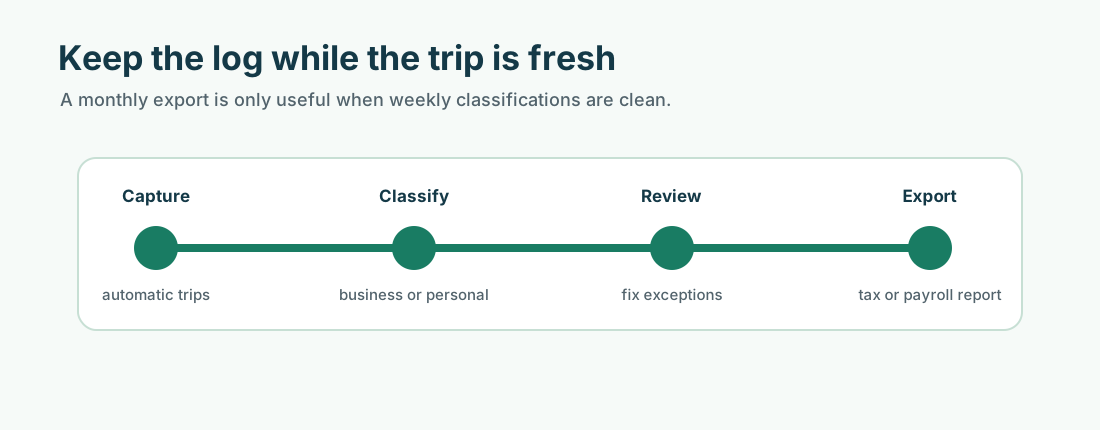
Good UK grey fleet mileage tracking software should cover the full workflow: automatic trip capture, business/private classification, driver submission, manager approval, reimbursement exports, HMRC-ready mileage records, role-based access, privacy controls, record retention, exception review, and reporting across personal vehicles, company cars, hire cars, and mixed teams.
The best setup keeps drivers in control of what they submit while giving finance and managers structured business-trip records. Managers should not need a full private movement history to approve a business mileage claim.
What grey fleet mileage tracking software does
Grey fleet software gives an organisation a repeatable way to manage business mileage when employees use private or third-party vehicles for work.
At minimum, it should help you:
- capture business trips close to the time of travel
- separate business and private journeys
- collect trip purpose, date, location or route, miles, driver, and vehicle
- let drivers review and submit trips
- let managers approve, reject, or query claims
- export records for finance, payroll, and reimbursement
- retain the evidence needed for later review
- support policy, insurance, and risk workflows without turning every trip into manual admin
It should support the people who actually share grey-fleet ownership: finance, HR, operations, health and safety, line managers, and drivers.
Why spreadsheets stop working
Spreadsheets can be a useful starting point because they show what fields you need. They stop working when the process has too many drivers, journeys, approvers, and exceptions.
Common failure points include:
- drivers submit different formats
- managers approve claims inconsistently
- business purpose is missing
- routes or miles are estimated after the fact
- document checks sit in a separate spreadsheet
- finance chases corrections before payroll
- records are hard to export for an adviser, accountant, HMRC, or internal review
The issue is usually not bad intent. It is a process that depends on memory and manual checking.
Track, classify, submit, approve, reimburse, retain
Use this workflow when you compare tools:
| Workflow step | What good software should support |
|---|---|
| Track | Capture date, time, distance, route or location data, driver, and vehicle in a consistent format |
| Classify | Let drivers mark journeys as business or private and correct obvious errors before submission |
| Submit | Collect trip purpose and any policy fields before the claim reaches a manager |
| Approve | Give managers enough detail to approve, reject, return, or query the journey |
| Reimburse | Export approved mileage by driver, vehicle, rate, period, and payment reference |
| Retain | Store records securely with sensible access, retention, and audit history |
Automatic tracking helps because it reduces reconstructed mileage. It does not remove the need for driver judgement or manager review.
HMRC records and reimbursement exports
Approved Mileage Allowance Payments (AMAPs) are HMRC’s tax-free mileage payment benchmark for employees using their own vehicle for business trips. Mileage Allowance Payments (MAPs) are payments an employer makes when an employee uses their own vehicle for business travel. Mileage Allowance Relief (MAR) is tax relief an employee may claim if the employer pays less than HMRC’s approved amount.
For mileage reimbursement, the software should produce records showing:
- trip date
- business purpose
- start and end location or route
- miles
- driver
- vehicle
- business/private classification
- reimbursement rate
- approval status
- export or payment reference
GOV.UK’s expenses and benefits recordkeeping guidance gives travel expenses as an example where employers should keep when and why the employee travelled and receipts where possible. For the employer control view, use Grey Fleet HMRC Compliance (UK).
Privacy and UK GDPR
UK GDPR is the UK data protection framework that affects how employers handle personal data, including employment and location data. Mileage tracking can involve sensitive employee concerns even when the business purpose is legitimate.
Good grey fleet software should support:
- driver visibility over captured trips
- driver control over business/private classification before submission
- clear separation between private travel and submitted business journeys
- role-based access for managers, finance, HR, and administrators
- audit trails for submitted and approved records
- retention settings that fit the record type
- clear employee communications about what is collected, why, who can see it, and how long it is kept
The ICO monitoring guidance explains how worker monitoring interacts with UK GDPR and the Data Protection Act 2018. It also notes that its guidance is under review following the Data (Use and Access) Act coming into law on 19 June 2025, so check ICO updates before making fixed policy claims.
Mixed fleet support
Many organisations do not have a pure grey fleet. They may have:
- employee-owned cars
- personal lease vehicles
- cash-allowance vehicles
- company cars
- pool cars
- hire cars
- vans, motorcycles, scooters, or bicycles
The software should let the business keep different rules for different vehicle models. Employee-owned vehicles may use AMAP/MAP/MAR logic. Company-car fuel may involve Advisory Fuel Rates (AFRs). Hire cars may need fuel, trip, and policy records but not AMAP treatment. A mixed fleet tool should not force one tax model across every vehicle.
For the ownership comparison, use Grey Fleet vs Company Cars (UK).
Approval and exception review
The goal is not to make managers inspect every mile. It is to make exceptions visible.
Useful exception signals include:
- missing trip purpose
- rounded or manually added mileage
- journeys outside expected work areas
- duplicate claims
- claims submitted long after the journey
- business travel during leave or outside expected hours
- expired insurance, MOT, licence, or policy acknowledgement
- unusually high mileage for the role
The software should help managers return incomplete claims before reimbursement, not approve weak records to keep payroll moving.
Scaling from 10 to 50+ drivers
At around 10 drivers, software can standardise the mileage submission process. At around 25 drivers, it can reduce manager and finance time spent chasing corrections. At 50 or more drivers, role-based access, audit trails, central reporting, team-level controls, and exportable records become much more important.
These are practical signals, not legal thresholds. A high-mileage field team may need structure earlier. A low-mileage office team may stay simple longer, but the record fields still need to be clear.
How MyCarTracks fits
MyCarTracks supports the mileage and reporting layer of grey-fleet management. It does not replace HMRC advice, HSE advice, insurance review, payroll review, or UK GDPR review.
MyCarTracks automatic mileage tracking can capture trips, let drivers classify business and private travel, and export reports by date, driver, vehicle, purpose, and distance. For teams, MyCarTracks fleet tracking can help administrators review team activity, vehicle activity, mileage reports, and reimbursement records from one workflow.
That makes it easier to move from late spreadsheets to submitted, approved, exportable records.
Buying checklist
| Question | Yes/No |
|---|---|
| Can drivers classify business and private journeys before submission? | |
| Can managers see only submitted business records instead of full private movement history? | |
| Does the report include date, purpose, locations or route, miles, driver, vehicle, rate, and approval? | |
| Can finance export approved claims for reimbursement or payroll review? | |
| Can different vehicle types use different rules? | |
| Does the tool support role-based access? | |
| Are audit trails and retention settings clear? | |
| Can exceptions be flagged for manager review? | |
| Can the process scale across teams without a dedicated fleet manager? | |
| Does the rollout plan explain privacy, UK GDPR, and driver control in plain English? |
Common mistakes
- Choosing a company-car tracking tool that treats private vehicles like company assets.
- Giving managers unnecessary access to private journey history.
- Collecting mileage data without explaining the purpose, access, and retention rules.
- Automating trip capture but leaving approval rules in spreadsheets.
- Using one tax treatment for employee-owned vehicles, company cars, and hire cars.
- Exporting totals without trip purpose or approval status.
- Forgetting that software supports the policy; it does not replace the policy.
FAQ
Does grey fleet software track private journeys?
It should not expose private journeys to managers by default. A privacy-conscious setup lets drivers review trips, classify business and private travel, and submit only business journeys for approval.
What records should grey fleet mileage software keep?
At minimum, keep the trip date, business purpose, start and end location or route, miles, driver, vehicle, reimbursement rate, approval status, and export reference.
Can software support company cars and grey fleet together?
Yes, but it needs separate vehicle rules. Employee-owned vehicles, company cars, hire cars, cash allowance vehicles, and pool cars can have different tax, fuel, insurance, and approval needs.
Is automatic tracking enough for HMRC?
Automatic tracking helps create timely records, but the record still needs business purpose, classification, review, and payment context. Treat automatic capture as evidence collection, not as tax advice.
Where to go next
- What Is a Grey Fleet? (UK)
- Grey Fleet Policy Guide (UK)
- Grey Fleet Risk Assessment (UK)
- Grey Fleet HMRC Compliance (UK)
- Grey Fleet vs Company Cars (UK)
- Current HMRC Mileage Rates (UK)
Sources
- ICO: Employment practices and data protection - monitoring workers
- ICO: Keeping employment records
- ICO: Employment information
- GOV.UK: Expenses and benefits for employers - record keeping
- GOV.UK: Expenses and benefits: business travel mileage for employees’ own vehicles
- GOV.UK: PAYE and payroll for employers - keeping records
- GOV.UK: Advisory fuel rates