The right grey fleet software should make every work trip easy to capture, classify, review, approve, and export without turning employee-owned vehicles into company cars. For Australian employers, that means trip-level kilometre records, driver control over submitted journeys, role-based review, reimbursement reports, and enough evidence to support policy, WHS, payroll, and tax conversations.
Start with the records your organisation has to trust. The ATO allowances and reimbursements guidance separates allowances from reimbursements, and the Comcare vehicles-as-a-workplace guidance explains that work vehicle risks can include grey fleet vehicles such as personal vehicles and worker-leased vehicles. Software does not make those obligations disappear, but it can keep the evidence and approval workflow from living in inboxes and spreadsheets.
This guide is for Australian employers, fleet administrators, finance teams, HR teams, WHS managers, operations managers, and team leads managing personal cars and employee-leased vehicles used on work trips. It is educational only and is not tax, WHS, payroll, legal, insurance, employment, or financial advice.
Quick answer
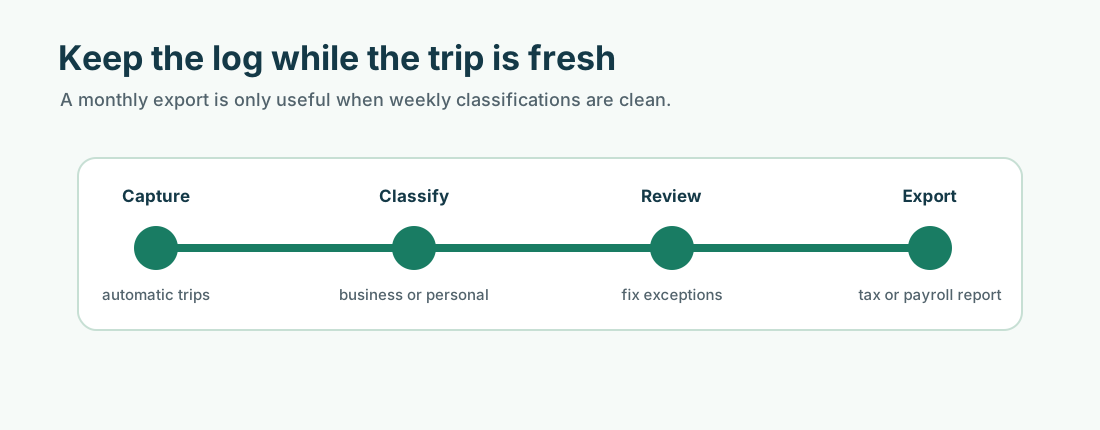
Choose grey fleet mileage tracking software that covers the full workflow: automatic trip capture, business/private classification, driver-submitted reports, manager approvals, reimbursement exports, document-check reminders, role-based administration, privacy controls, and reliable record retention.
For Australian grey fleets, do not choose software only because it tracks GPS. Choose it because it helps your organisation keep consistent mileage records, separate private travel from work travel, review claims before payment, support ATO and FBT recordkeeping where relevant, and keep grey-fleet controls visible across HR, finance, WHS, operations, and team managers.
What grey fleet software needs to do
Grey fleet software gives your organisation a repeatable way to manage private vehicles used for work. In mileage-tracking terms, it should help you:
- Track work journeys with kilometres, dates, routes, and trip timing.
- Classify each trip as business, private, commuting, or another policy category.
- Submit driver reports that include the trip purpose and vehicle used.
- Review claims consistently before reimbursement or payroll processing.
- Reimburse approved kilometres under your policy, award, agreement, contract, or adviser-reviewed tax treatment.
- Report by driver, vehicle, team, date range, purpose, distance, reimbursement amount, and approval status.
- Retain records in a form that finance, payroll, accountants, and auditors can actually use later.
That last point matters. The ATO motor vehicle expense records guidance lists records such as business and private kilometres, receipts, loan or lease documents, registration papers, and calculation details for business motor vehicle expenses. For employee-owned grey-fleet vehicles, your exact record set depends on the payment arrangement, but a weak trip record makes every later decision harder.
Good grey fleet software also reflects shared ownership. Finance may own reimbursement. HR may own policy communication. WHS or operations may own risk controls. Team managers may approve journeys. The system needs to work for all of them, not only for a specialist fleet manager.
Why spreadsheets stop working
Spreadsheets can work at the start. They help you define fields, test an approval process, and learn what drivers forget to submit.
They stop working when the grey fleet grows. More drivers, more trips, more managers, and more vehicle documents create more versions of the truth. By the time a finance team is chasing missing trip purposes or a manager is approving rounded distances close to payroll cut-off, the spreadsheet has become part of the risk.
Common warning signs include:
- employees submit mileage in different formats
- distances are rounded, estimated, or copied from map searches
- trip purpose fields are missing or too vague
- records arrive weeks after the trip
- approvals vary by manager
- registration, licence, roadworthiness, or business-use insurance checks depend on manual reminders
- claims, policy acknowledgements, and supporting documents sit across inboxes, shared drives, and chat threads
If those problems are already visible, start with the grey fleet risk assessment guide and then choose software that supports the controls you decide to keep.
Why grey fleet software is different from fleet management software
Traditional fleet systems are usually built around company-owned or employer-leased vehicles. They may assume central vehicle control, installed hardware, telematics, fuel cards, servicing schedules, and a fleet team that controls the vehicle.
Grey fleet software has a different job. The driver owns or leases the vehicle, uses it outside work, and may only submit a small number of business trips each month. Your organisation still needs the work-use evidence, but it should not treat the employee’s private vehicle like a company asset.
That changes the buying criteria:
| Need | Company fleet system | Grey fleet mileage software |
|---|---|---|
| Vehicle control | Employer controls vehicle choice, servicing, and use | Employer approves private vehicles for work use under policy |
| Tracking model | May use fixed hardware or telematics | Usually driver app, automatic capture, and submitted reports |
| Privacy | Built for employer-owned assets | Must protect private travel and driver control |
| Records | Fleet, fuel, maintenance, FBT, and asset records | Trip, reimbursement, driver, vehicle-check, and approval records |
| Users | Fleet team and operations | Drivers, managers, finance, HR, WHS, and operations |
| Best fit | Company cars, pool cars, vans, and managed fleet assets | Employee-owned and employee-leased vehicles used for work |
For mixed fleets, you may need both views. A field team might include company cars, hire cars, and private vehicles. The software should let you report by vehicle type without mixing the tax, WHS, insurance, and reimbursement treatment.
Privacy by design
Privacy is usually the first adoption hurdle. Employees using their own vehicles do not want managers to see every personal journey, weekend trip, school run, medical appointment, or sensitive client address.
For many Australian organisations, trip and location data can be personal information. The OAIC Australian Privacy Principles cover collection, use, disclosure, governance, security, access, and correction of personal information for APP entities. The practical point is simple: design the process so the employer receives the records it needs, not a full private driving history.
Look for:
- driver accounts where the driver controls which trips are submitted
- clear separation between business reports and private trip history
- report settings that can limit or redact sensitive location details where the policy allows it
- written explanations of what managers can see and what they cannot see
- access levels for drivers, managers, finance, HR, WHS, operations, and administrators
- retention settings that match your recordkeeping policy
Put this in your grey fleet policy. Drivers are more likely to use tracking properly when the rules are clear before the first trip is captured.
ATO records and reimbursement reports
Grey fleet software should make reimbursement evidence easier, but it should not blur payment types. A cents per kilometre payment, a car allowance, exact reimbursement of expenses, an employee tax deduction, a company car, and a novated lease are different workflows.
For employee-owned cars, the ATO expenses for a car you own or lease guidance lists 88 cents per kilometre for the 2024-25 and 2025-26 cents per kilometre method and explains that the cents per kilometre method still needs support for how work-related kilometres were worked out. That ATO rate is not a universal employer reimbursement requirement. Employer payment obligations can also depend on an award, enterprise agreement, contract, or policy.
At a minimum, your software should let each submitted report show:
- driver name
- vehicle used
- trip date
- start and end location, or a policy-approved equivalent
- trip purpose
- kilometres travelled
- business/private classification
- reimbursement rate or payment category
- approval status and approver
- export date and report period
For deeper tax and payroll handling, use the Australia guides on mileage reimbursement rules for employers, the current ATO cents per kilometre rate, ATO car logbook requirements, and car fringe benefits tax.
Automatic tracking and accuracy controls
Most mileage problems are ordinary process problems: a missed trip, a rounded distance, a private detour included by mistake, or a purpose added later from memory.
Automatic mileage tracking reduces that friction by capturing trips as they happen. The software should still let drivers correct, split, merge, or classify trips before submission, because the business/private decision often depends on context that a GPS trace alone cannot know.
Useful controls include:
- automatic trip detection from a phone app or paired device
- manual trip entry with clear flags for review
- map or route visibility for submitted business trips
- duplicate-trip detection
- distance changes or unusual claims flagged for manager review
- recurring route recognition without forcing automatic approval
- exportable reports for payroll, reimbursement, accountant, and audit files
The goal is not to make every manager inspect every route. It is to create enough consistency that ordinary claims can move quickly and exceptions get the attention.
Approvals and role-based administration
Grey fleet management usually touches several teams. Software should make ownership visible instead of assuming one person knows everything.
Set up roles such as:
| Role | What they should be able to do |
|---|---|
| Driver | Capture trips, classify travel, add purposes, submit reports, update vehicle details |
| Manager | Review submitted work trips, approve or reject claims, ask for corrections |
| Finance or payroll | Export approved reimbursement reports, reconcile payments, retain supporting files |
| HR or people team | Manage policy acknowledgement, onboarding, and role eligibility |
| WHS or operations | Review work-trip patterns, incident records, vehicle approvals, and risk controls |
| Administrator | Manage teams, users, vehicles, reporting settings, and access permissions |
Keep approvals separate from payroll wherever possible. A manager can confirm that a trip was work-related, while finance or payroll checks the payment type and timing before money is paid.
Scaling from 10 drivers to 50+
The software decision changes as the grey fleet grows.
| Grey fleet size | What usually breaks | Software priority |
|---|---|---|
| Around 10 drivers | Claims arrive in different formats | One submission process and clear trip fields |
| Around 25 drivers | Managers spend too much time checking reports | Automatic capture, exception review, and consistent approvals |
| 50+ drivers | Teams drift into local habits | Role-based access, central reporting, document reminders, and audit trails |
At each stage, review whether private vehicles are still the right model. A growing number of high-kilometre drivers may point to a grey fleet vs company cars review, while occasional drivers may only need better policy, tracking, and reimbursement controls.
WHS evidence and duty of care
Software is not a WHS program by itself. It can, however, help you show that grey-fleet controls are being used.
Safe Work Australia’s vehicle hazards guidance says a vehicle used for a work purpose is a workplace, including when a worker uses their own vehicle for work. It also points to practical controls such as vehicle suitability, maintenance, road rules, incident reporting, dangerous conditions, fatigue, training, policies, and procedures.
For a grey fleet, software can support the evidence trail for:
- approved drivers and vehicles
- licence, registration, roadworthiness, and business-use insurance checks required by your policy
- driver declarations and policy acknowledgements
- trip patterns, high-kilometre roles, remote travel, or after-hours driving
- incident records and follow-up actions
- recurring review of vehicles, drivers, teams, and reimbursement reports
Use software alongside a grey fleet policy and grey fleet risk assessment. Also check state or territory regulator requirements, insurer wording, awards, agreements, contracts, and professional advice where the risk or payment treatment is significant.
Mixed fleets, hire cars, and company vehicles
Do not force every vehicle into one category. Grey fleet software should help you keep vehicle ownership and use clear.
Track private vehicles, employee-leased vehicles, company cars, pool cars, hire cars, and novated lease vehicles separately where they appear in the same organisation. The trip record may look similar, but the policy, insurance, reimbursement, payroll, FBT, and recordkeeping outcomes can differ.
For example:
- employee-owned vehicles need driver-submitted trip records and private-vehicle checks
- company cars may need private-use controls, odometer support, logbooks, and FBT review
- hire cars may need trip records, fuel or charging support, tolls, and policy approval
- novated leases need separate payroll, FBT, and employee-advice review
If your organisation is mixing models, keep a shared reporting view but separate the rules behind each vehicle type.
How MyCarTracks helps grey fleet teams
MyCarTracks automatic mileage tracking can capture trips, separate business and private kilometres, and export reports by driver, vehicle, date, purpose, distance, and reimbursement review needs.
For teams, MyCarTracks fleet tracking can help administrators see vehicle and driver activity, review submitted records, manage team reporting, and export data for finance, payroll, policy review, or accountant checks.
Use those records as part of your grey-fleet workflow: drivers submit the work trips they want reviewed, managers approve the trip purpose, finance exports approved reports, and HR, WHS, or operations can review patterns without relying on month-end spreadsheets.
What to look for in short
Choose grey fleet mileage tracking software that gives you:
- automatic trip capture with driver correction
- business/private classification
- driver control over submitted reports
- clear manager approval workflow
- exportable reimbursement and audit reports
- role-based administration
- privacy settings for personal and sensitive trips
- support for employee-owned, employee-leased, hire, and company vehicles
- document-check reminders for licence, registration, insurance, roadworthiness, and policy acknowledgements
- evidence that can support ATO, WHS, payroll, FBT, and adviser review without pretending to replace that review
If a tool only gives you a map, it is not enough. A useful grey fleet system gives your organisation a consistent record of who drove, why the trip happened, which vehicle was used, who approved it, and what payment or review followed.
FAQ
Will managers see employees’ private trips?
It should not give managers unrestricted access to private driving. A better setup lets drivers capture trips, classify them, and submit only the work journeys required under the policy. Private trips should remain private unless the driver chooses to use them for their own records.
How does grey fleet mileage tracking work?
Grey fleet mileage tracking records business kilometres when employees use private or employee-leased vehicles for work. It should capture trip dates, distances, routes or locations, purposes, vehicle details, approvals, and reimbursement reporting.
Which ATO cents per kilometre rate matters?
In the employee car-expense deduction context, ATO material lists 88 cents per kilometre for both 2024-25 and 2025-26. Employers often use that figure as a policy benchmark, but it is not a universal reimbursement rule. Check the payment type, kilometre limit, award, agreement, contract, policy, payroll treatment, and adviser advice.
What records should grey fleet drivers submit?
Drivers should submit enough detail to show the trip was work-related: date, start and end location or route, purpose, kilometres, vehicle, business/private classification, and any policy-required notes. Your organisation may also need supporting licence, registration, roadworthiness, insurance, reimbursement, payroll, FBT, or incident records.
Can software replace a grey fleet policy?
No. Software can make the policy easier to apply, but it does not decide who is allowed to drive, which vehicles are acceptable, what insurance wording is enough, how incidents are handled, or how WHS and tax advice applies. Put those rules in the policy, then configure the software to support them.
When should we move from spreadsheets to software?
Move when mileage reports arrive in different formats, approvals are inconsistent, trips are estimated, document checks are missed, or finance spends too much time correcting claims. Those are signs that the process has outgrown manual controls.
Where to go next
- What Is a Grey Fleet? (Australia)
- Grey Fleet Policy Guide (Australia)
- Grey Fleet Risk Assessment (Australia)
- Grey Fleet vs Company Cars (Australia)
- Mileage Reimbursement Rules for Employers (Australia)
- ATO Car Logbook Requirements (Australia)
- Car Fringe Benefits Tax (Australia)
Sources
- ATO: Allowances and reimbursements
- ATO: Expenses for a car you own or lease
- ATO: Motor vehicle expense records you need to keep
- ATO: Record keeping for FBT
- Safe Work Australia: Model Work Health and Safety Act
- Safe Work Australia: Vehicle hazards
- Comcare: Vehicles as a workplace
- OAIC: Australian Privacy Principles