If you ordered a plan with the auto-renewal option, then a recurring profile was made in your PayPal account. If your Credit/Debit card expires and you add a new one to your account, this new card will not be automatically assigned to this recurrent profile. You have to reassign this new card to our profile.
Here’s how to change your funding source for pre-approved payments:
- Log in to your PayPal account – https://www.paypal.com/signin.
- Click your name batch on the top right and select Account Settings.
- On the left choose**Money, banks and cards.
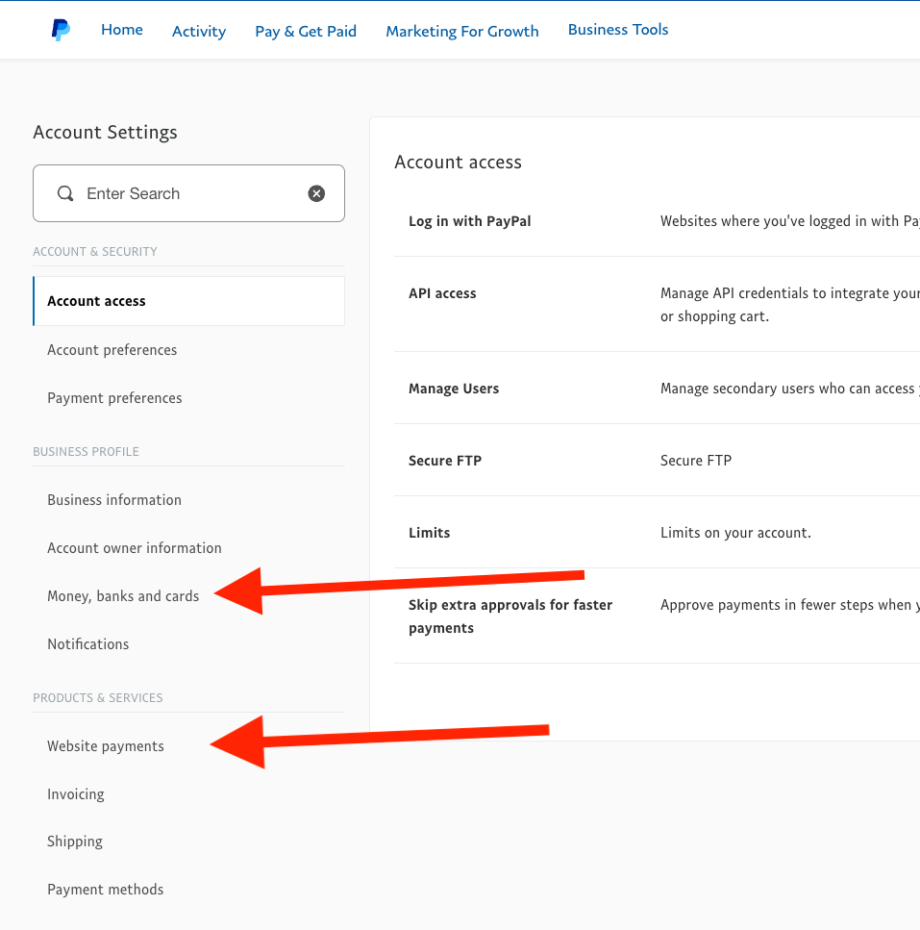
4. Under Cards, add the new card.
5. Again, in the left menu select Website Paymentsand on the line with My automatic payments click on the Update button.
6. You will be redirected to My preapproved payments, where you will see a table with automatic payments.
7. Search for Slash Idea or MyCarTracks and click on it.
8. ClickChange next to Backup Funding Source in the Funding Source section.
9. Select the new payment method you’d like to use and click Save.
Paypal will use that updated payment information for the next recurring payment taken for your MyCarTracks subscription.
More information is available at PayPal.
Source: How To Change Your Payment Information Within Paypal