There are situations when you want to create a map with selected tracks and share this map with your customer as proof of work done, for example, a flyer distribution or leaf and dirt cleaners.
MyCarTracks offers you a way how you can easily select recorded tracks and create a shared map with these selected tracks. You can do that by following these steps:
- In the web application, go to Tracks and the tab List
- Use the Adjust filter button to filter out tracks you want to share
- Now you can select tracks to add using a checkbox located on the left side of every row. If there is no checkbox, then you’re not allowed to share such a track.
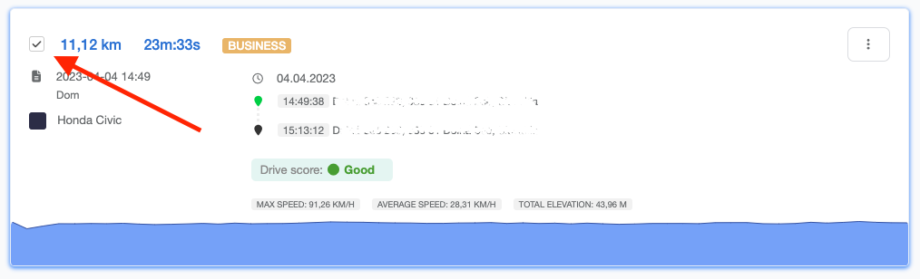
Hint: To select all tracks, use the Select all button above the tracks.
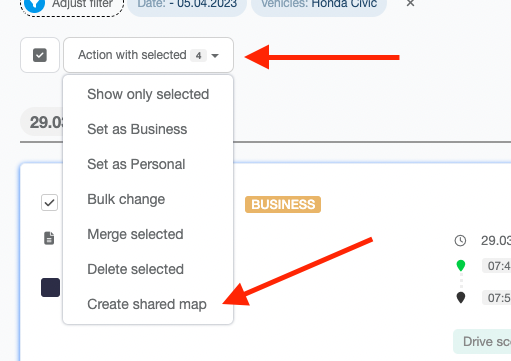
4. After you’re done with the selection, click on the Action with selected button on top of the list and select the Create shared map option:
5. This will create a shareable link and redirect you to existing shared maps. You can access this list anytime from Configuration > Map sharing or Tracks > Sharing:
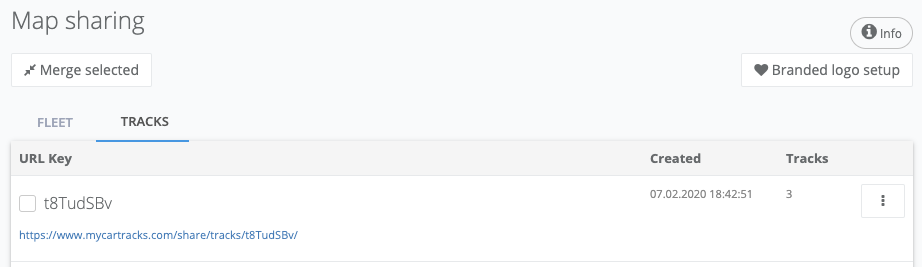
- You can now copy this new link and send it to your customer.